What is Brainner?
Brainner is a really smart AI tool built to make hiring much smoother. It automates finding candidates and comparing resumes, which can really speed things up for HR teams. It is your AI assistant for recruitment. It looks at your job descriptions, figures out what you’re really looking for, sorts candidates into categories, and lets you set your own screening rules. Brainner can even screen applicants as they come in, giving you detailed reports for each person. Plus, you can add your own screening criteria that might not have been in the original job post. It connects with most HR software, making the whole hiring process faster and more accurate by cutting down on those common human mistakes. And don’t worry about data privacy – Brainner is fully compliant with GDPR, CCPA, and EU AI standards, so your data is well-protected.
Who created Brainner?
A team of developers created Brainner with the goal of completely changing how recruitment works using advanced AI. They launched it on May 24, 2023, focusing on making resume screening and candidate searches automatic. The company is serious about data protection, adhering to global standards like GDPR and CCPA. They offer different plans to suit various needs, whether you’re a small team, a growing business, or a large enterprise. While the founder’s name isn’t specifically mentioned, you can find all the details about Brainner’s features and how it works on their official website.
What is Brainner used for?
Brainner is designed to handle a lot of the heavy lifting in recruitment. Here’s a breakdown of what it can do:
- Automated Resume Comparisons: It automatically compares resumes to find the best matches.
- Real-time Screening: It screens applicant profiles as they apply, so you’re always up-to-date.
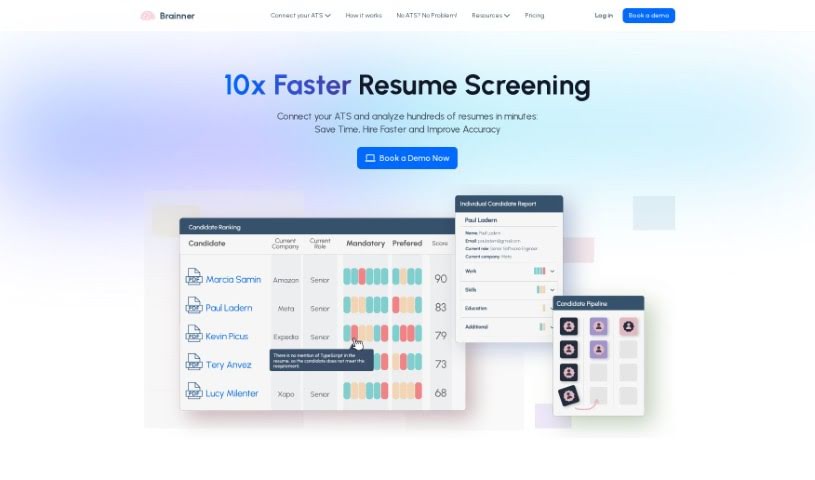
- Dynamic Candidate Ranking: Candidates are ranked based on how well they fit the job, with clear reasons why.
- Customizable Screening Criteria: You can set and adjust exactly what you’re looking for in a candidate.
- Detailed Candidate Reports: Get in-depth reports for each applicant to help you make informed decisions.
- HR Software Integration: It works smoothly with many popular HR software solutions.
- Bulk Resume Upload: You can upload multiple resumes at once if needed.
- Intuitive Candidate Search: It makes searching for candidates feel natural and easy.
- Unlimited Roles: Create as many open job positions as you need.
- Team Collaboration: Features are included to help your team work together effectively.
- Speeds Up Hiring: Significantly reduces the time it takes to fill a position.
- Job Description Analysis: It breaks down job descriptions to pull out the most important requirements.
- Extracts Key Criteria: Automatically identifies the essential skills and experience needed.
- Categorizes Candidates: Sorts applicants into helpful groups.
- Appealing Job Descriptions: Helps make your job postings more attractive to candidates.
- Criteria Recommendations: Suggests which criteria should be mandatory or preferred.
- Real-time Profile Screening: Continuously filters profiles as applications come in.
- Candidate Ranking Feature: Provides a clear, ranked list of candidates.
Who is Brainner for?
Brainner is a valuable tool for anyone involved in the hiring process, including:
- HR Professionals
- Hiring Managers
- Directors
- Human Resources Teams
How to use Brainner?
Using Brainner effectively is straightforward. Just follow these steps to get the most out of it:
- Import Job Description: Start by importing your job description directly from your Applicant Tracking System (ATS) into Brainner. The AI will then analyze it, pulling out the key screening criteria and organizing them into categories like Work Experience, Education, and Skills.
- Customize Criteria: Once the AI has extracted the initial criteria, you can fine-tune them to perfectly match your company’s hiring standards. Feel free to change, remove, or add any criteria you think are important. You can also mark them as either mandatory or preferred, which helps Brainner conduct a more precise candidate search.
- Analyze and Make Decisions: As candidates start applying, Brainner will immediately begin sorting through their profiles in real-time. You can see how candidates stack up against the role requirements, with clear explanations for their ranking. Reviewing individual candidate reports will help you decide who to invite for an interview.
- Real-time Screening: Take advantage of the real-time screening feature. It ensures that applicant profiles are efficiently filtered based on the specific criteria you’ve set, saving you a lot of manual effort.
- Detailed Reports: Each candidate comes with a detailed report that offers valuable insights, helping you make more informed decisions about who to interview.
- Dynamic Candidate Ranking: Brainner dynamically ranks candidates based on how well they meet the job requirements. You’ll get clear explanations for each criterion, making the selection process transparent.
- Tailored Filters: The tool uses specialized AI filters to speed up your candidate search. It analyzes resumes based on the unique parameters you define, ensuring you find the right people faster.
- Optimized Job Descriptions: Brainner helps improve your job descriptions by extracting key criteria and even suggesting ways to make them more appealing to potential applicants.
- Flexible Subscription: You have the flexibility to change your subscription plan whenever your recruitment needs evolve, ensuring you always have the right level of service.
- Customer Support: If you need help, Brainner offers dedicated email support. You can also book a meeting for personalized assistance tailored to your situation.
- Payment Methods and Refunds: Brainner accepts credit card payments. For larger transactions, over $1,000, ACH payments are also an option. Refunds are handled in specific situations, such as when you cancel your subscription before any applicants have been processed.