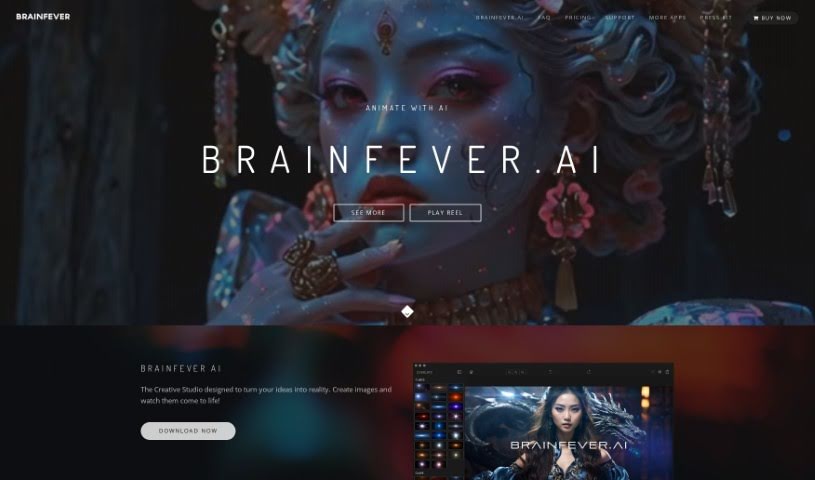
Screenshot of Brainfever

Brainfever

Discover what Brainfever is and how to use it effectively in 2025. We'll explore its features, compare it to other AI art generators, and show you how to get the most out of it.

Screenshot

What is Brainfever?

BrainFever is an advanced AI art generator that turns your text ideas into visual images. It uses powerful AI models, including OpenAI’s DALL-E 3 and SDXL stable diffusion, to bring your descriptions to life. You can create all sorts of images – think objects, scenes, even animations! Plus, BrainFever gives you advanced photo editing tools to tweak and perfect your creations. It also supports different aspect ratios and adds cool special effects like rain and fog. Everything you make is organized in a project library, and best of all, you own the rights to your images, meaning you can reprint, sell, or use them for merchandise however you like.

Who created Brainfever?

Brainfever AI is the company behind this impressive tool. They’ve developed a really powerful image generator that transforms text prompts into stunning visuals, including both images and videos. It’s built on advanced AI models like OpenAI’s DALL-E 3 and SDXL stable diffusion. Brainfever first launched on January 26, 2023, and it’s available for both iOS and Mac devices. You’ll find it packed with features like various style templates, special effects, and tools to keep your projects organized. If you’re a regular user, their Pro membership offers 200 credits each month for generating images and videos.

What is Brainfever used for?

Brainfever is incredibly versatile! Here’s a rundown of what you can do with it:

  • Turn text into images: Simply describe what you want, and Brainfever creates it.
  • Edit like a pro: It comes with advanced photo editing tools to refine your artwork.
  • Leverages top AI: It uses both the DALL-E 3 model and SDXL stable diffusion models.
  • Flexible sizing: Supports various aspect ratios to fit your needs.
  • Diverse creations: Generates all sorts of image types.
  • Bring images to life: You can even create animations.
  • Add atmosphere: Includes special effects like rain and fog.
  • Works everywhere Apple: It runs smoothly on all Apple devices.
  • Stay organized: Features an in-built project library to manage your creations.
  • Own your work: Guarantees user ownership rights for everything you create.
  • Use your art freely: Supports reprinting, selling, and merchandising your images.
  • Experiment with styles: Offers a variety of styles and templates to explore.

Who is Brainfever for?

Brainfever is a fantastic tool for anyone who works with visuals or needs to create them. This includes:

  • Artists
  • Designers
  • Content creators
  • Visual creatives
  • Graphics professionals
  • Marketers
  • Merchandisers
  • Teachers
  • Students
  • Graphic designers
  • Illustrators
  • Animators
  • And generally, any creative professional!

How to use Brainfever?

Ready to start creating with BrainFever? Here’s a simple, step-by-step guide to help you get the most out of its AI art generator:

  1. Describe Your Vision with Text Prompts: Begin by typing in text prompts that clearly describe the image you have in mind. BrainFever’s advanced AI models, like OpenAI’s DALL-E 3 and SDXL stable diffusion, will then translate these descriptions into visual images.
  2. Explore Different Styles: BrainFever offers a wide range of styles and templates. Don’t hesitate to experiment with these options to find the perfect look and feel for your vision.
  3. Refine with Editing Tools: After the initial image is generated, you can use BrainFever’s advanced photo editing tools to make further refinements. This is your chance to tweak details and achieve the exact result you’re aiming for.
  4. Add Special Effects: Want to add a bit more flair? You can enhance your images with special effects like rain, fog, and other overlays that BrainFever provides. These can really add depth and creativity to your work.
  5. Create Animations: BrainFever isn’t just for still images; you can also create animations! Explore this feature to bring your creations to life with dynamic movement.
  6. Keep Projects Organized: Make use of the project library feature to manage and organize all your creative outputs. It’s a great way to stay structured and easily find your artworks whenever you need them.
  7. Understand Your Ownership Rights: BrainFever respects your creative ownership. You own the rights to the images you create, which means you have the freedom to reprint, sell, and use them for merchandise.
  8. Enjoy Cross-Platform Compatibility: BrainFever is designed to work smoothly across all your Apple devices, whether you’re on iOS or Mac. This makes it super convenient and accessible.
  9. Manage Your Credits: Keep in mind how the credits work. Each image you generate uses 1 credit, and videos use 5 credits. The Pro plan gives you 200 credits monthly, and you can always buy more if you run out.

By following these steps, you can really tap into Brainfever’s powerful AI capabilities to let your creativity flow and generate amazing images and animations with ease.

Related AI Tools

Discover more tools in similar categories that might interest you

123RF AI Image Generator

Creative Image Generation
Learn More

Stay Updated with AI Tools

Get weekly updates on the latest AI tools, trends, and insights delivered to your inbox

Join 25,000+ AI enthusiasts. No spam, unsubscribe anytime.