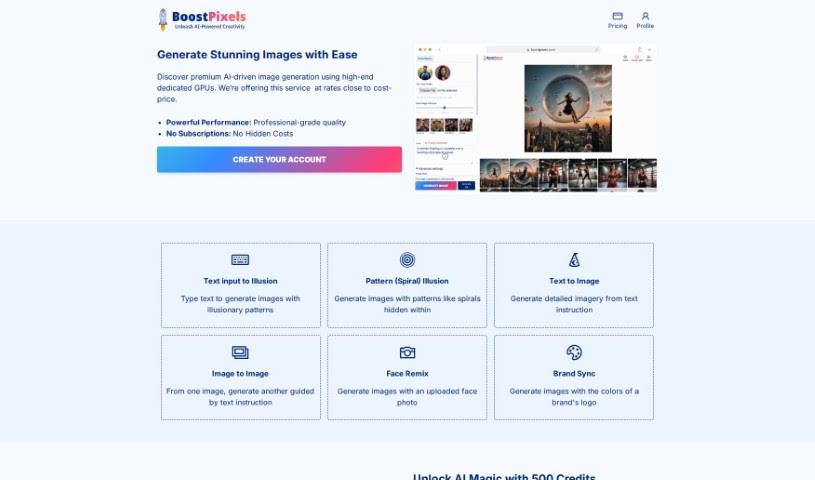
Screenshot of BoostPixels

BoostPixels

Discover what BoostPixels is and how to use it for creating high-quality images in 2025. We'll explore its features, compare it to other AI image generators, and guide you through its usage.

Screenshot

What is BoostPixels?

BoostPixels Flat is a fantastic free tool that uses AI to create really high-quality images. You can either come up with your own custom prompts, or pick from a gallery of ready-made ones. To get started, you’ll need to upload your logo – they accept PNG, JPEG, JPG, and WebP formats. Once your logo is in, you can choose the image quality you’d prefer, either 512px or 1024px. It’s super handy for all sorts of things, like making your website look great or creating eye-catching marketing materials. Plus, BoostPixels is really serious about keeping your information private, sticking closely to their terms of use and privacy policies. If you ever get stuck or have questions, their team is there to help.

Who created BoostPixels?

BoostPixels Flat was developed by BoostPixels, a company that focuses on providing free AI image generation tools. They launched this particular tool on July 18, 2023. The idea is pretty straightforward: you upload your logo, and then you can generate high-quality images using either your own prompts or some they’ve already set up. These predefined prompts can cover things like flat lay photography, groceries, and more. BoostPixels gives you a choice between two image quality settings, and they also have a blog where you can find more information and keep up with the latest news in AI image generation. They’re committed to user privacy, making sure to follow their terms of use and policies carefully.

What is BoostPixels used for?

BoostPixels is incredibly versatile and can be used for a wide range of creative and professional needs:

  • Marketing Materials: Create compelling visuals for your campaigns.
  • Creative Projects: Bring your unique ideas to life.
  • Artistic Image Creation: Generate original artwork.
  • Digital Content Creation: Produce engaging graphics for online platforms.
  • Website Designs: Enhance your site’s visual appeal.
  • Other Creative Design Purposes: Whatever your design project, BoostPixels can help.
  • Logo Creation and Enhancement: Refine or create new logo variations.
  • Social Media Graphics: Design eye-catching posts for social media.
  • Customizing Visual Content: Tailor images to your specific brand or message.
  • Brand Identity Design: Develop consistent visual elements for your brand.

Who is BoostPixels for?

This tool is particularly useful for a few key groups:

  • Website Designers: Easily create custom graphics and visuals for websites.
  • Marketing Professionals: Develop professional marketing materials and campaigns.
  • Creative Project Designers: Anyone working on design projects will find it helpful.
  • Creative Projects Professionals: Those whose careers involve creative design work.

How to use BoostPixels?

Using BoostPixels Flat is pretty straightforward. Here’s a simple guide to get you started:

  1. Logo Upload: First things first, upload your logo. They accept PNG, JPEG, JPG, and WebP files. This logo will be the foundation for the images you create.
  2. Select or Create a Prompt: You have two options here. You can pick from a variety of prompts they’ve already prepared, like “flat lay photography” or “groceries.” Alternatively, you can write your own custom prompt to get exactly the image you’re envisioning.
  3. Image Quality: Next, decide how clear you want your image to be. You can choose between 512px or 1024px resolution, depending on what you need the image for.
  4. Generate Image: Once your logo is uploaded and you’ve picked your prompt and quality setting, just hit the generate button. The tool will then create your unique image.
  5. Usage: The images you generate are ready to be used for all sorts of things! Think website designs, marketing materials, or any other creative projects you’re working on.
  6. Information Support: If you’re curious about AI image generation or want to know more about BoostPixels, check out their blog. It’s a great place for extra insights and updates.
  7. Privacy: BoostPixels takes your privacy seriously. They strictly follow their terms of use, privacy policy, and cookie policy guidelines to keep your data safe.
  8. Support: Need a hand or have a question? Don’t hesitate to reach out to the BoostPixels team. You can find their contact information on their website.

By following these steps, you can really make the most of BoostPixels Flat for generating high-quality, AI-powered images that are perfectly suited to what you need.

Related AI Tools

Discover more tools in similar categories that might interest you

123RF AI Image Generator

Creative Image Generation
Learn More

Stay Updated with AI Tools

Get weekly updates on the latest AI tools, trends, and insights delivered to your inbox

Join 25,000+ AI enthusiasts. No spam, unsubscribe anytime.