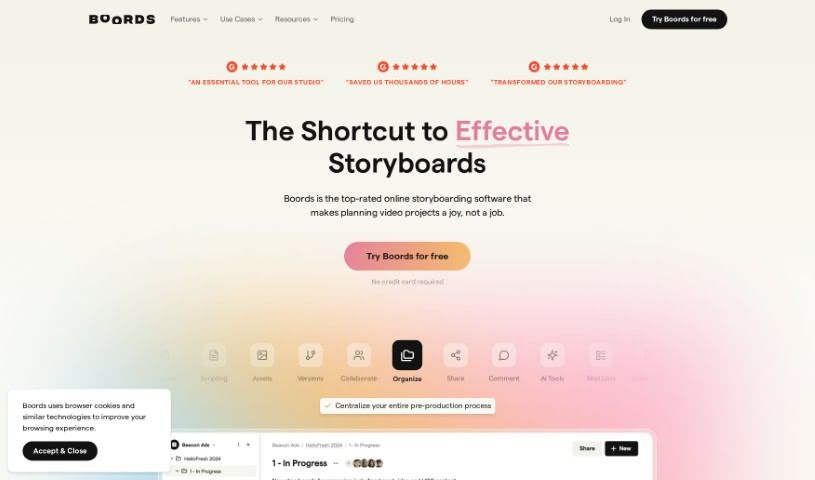
Screenshot of Boords

Boords

Discover what Boords is and how to use it effectively in 2025. Explore its features and see how it stacks up against other content creation tools.

Screenshot

What is Boords?

Boords is a storyboard tool that’s really impressed people with its easy-to-use design, smooth collaboration features, and how it simplifies storyboarding for creative folks. Users say Boords has made their work much better by cutting out repetitive tasks, letting them make quick changes, making it easier to get client feedback, and keeping all their storyboards organized in one spot. Plus, it has an AI Storyboard Generator that lets you create amazing-looking storyboards fast, even if you’re not an artist. Basically, people find Boords is a crucial part of their creative process, making storyboarding more efficient, collaborative, and visually appealing.

Who created Boords?

Boords was started by Lewis Darby, who also founded Yard B. They launched their intuitive and flexible storyboarding tool on September 12, 2023. Boords has earned a lot of praise for making storyboarding faster, more adaptable, and easier to collaborate on, which has really changed how many users work.

What is Boords used for?

  • Boords helps you streamline your storyboarding process, saving you time and effort on formatting and rearranging frames.
  • It makes presenting ideas to clients much smoother, cutting down on the back-and-forth.
  • You can easily collaborate on storyboards, making the process more interactive and keeping track of different versions.
  • Boords helps organize your projects and lets you download your storyboards as PDFs.
  • With Boords’ AI Storyboard Generator, you can quickly create visually appealing storyboards without needing to draw.
  • It simplifies creating scripts and storyboards, so you can focus more on the creative side of your projects.
  • Boords offers tools to generate scripts, scenes, characters, and visuals in various styles to really boost your storytelling.
  • You can easily share your generated storyboards as PDFs or online, perfect for collaborating from anywhere.
  • It improves team communication by letting you add review notes and making the feedback process smoother.
  • Boords has become a go-to tool for many workflows, boosting efficiency, productivity, and overall satisfaction.
  • Boords makes it simple to produce visually pleasing storyboards.
  • You get real-time feedback and can easily iterate on changes.
  • It saves you time by automating tasks like rearranging frames.
  • Collaboration and version tracking are a breeze, making the whole process more efficient.
  • Sharing storyboards with clients for feedback is straightforward.
  • The AI Storyboard Generator lets you create stunning storyboards quickly, no drawing skills needed.
  • It also features an AI Script Generator and AI Image Generator to speed up script and visual creation.
  • You’ll find a user-friendly interface with drag-and-drop for creating scenes and characters.
  • There are various style options to make your storytelling pop.
  • Sharing your storyboards as PDFs or online for remote collaboration is easy.
  • Keep all your storyboards in one convenient place.
  • Add review notes to help your design team communicate better.
  • It really streamlines the whole storyboarding process.
  • Track feedback with versioning, commenting, and presentation tools.
  • Collaborate efficiently on your storyboards.
  • Use the AI Storyboard Generator for quick storyboard creation.
  • Generate complete scripts, including direction, sound, and action notes.
  • Turn your text prompts into vibrant scenes with the AI Image Generator.
  • Use the intuitive drag-and-drop interface to create scenes or characters.
  • Share storyboards easily for remote collaboration.
  • Boords helps streamline storyboarding by letting you quickly sketch out ideas, add scripts, get real-time feedback, and make changes fast.
  • It helps you focus on the creative parts of storyboarding instead of formatting, making the process more intuitive and integrated.
  • Boords automates the tedious work of rearranging storyboard frames, so you can experiment more without stress and be more creative.
  • The tool helps you present ideas to clients effectively, manage versions, and encourage collaborative storyboarding.
  • You can organize projects efficiently, create great-looking storyboards, and work smoothly with teams and clients using Boords.
  • Boords’ AI Storyboard Generator lets you create stunning storyboards in minutes without drawing skills. You can also generate scripts, scenes, characters, and visuals in different styles.
  • This AI tool includes an AI Script Generator and AI Image Generator to simplify creating scripts and visuals, plus a range of style options to enhance your storytelling.
  • Boords’ Text-to-Image feature uses AI to create images from your scripts, making storyboard creation much simpler.
  • You can easily share generated storyboards as PDFs or online for remote collaboration, which is great for video agencies, independent creators, and beginners.
  • Boords is essential for anyone creating storyboards in video production, making the process faster, more flexible, collaborative, and adding real value to storytelling.
  • Boords helps streamline storyboarding, saving time and effort on rearranging frames and allowing for more experimentation without stress.
  • It automates the tedious tasks involved in rearranging storyboard frames.
  • Boords makes it simple to track versions and encourages collaborative storyboarding.
  • It helps you present ideas to clients, focusing on creativity rather than formatting.
  • You can easily organize and share storyboards with clients for visualization and feedback.
  • Boords offers an AI Storyboard Generator for creating stunning storyboards quickly without drawing skills. It also provides script generation, image transformation, a drag-and-drop interface, and various style options.
  • It enhances collaboration, feedback handling, and client communication with versioning, commenting, and presentation features all in one platform.
  • It boosts efficiency, productivity, and studio happiness by streamlining storyboarding processes.
  • Boords is intuitive, looks great, and saves time, solving the common pain points in storyboarding and pre-production.
  • The tool is essential for video production, offering flexibility and ease in creating visually appealing storyboards.
  • Boords helps streamline storyboarding, making it easy to produce storyboards just how you want them and allowing for simple client feedback and changes.
  • Boords makes it easy to keep all your storyboards in one place and add review notes for smoother communication with design teams.
  • The AI Storyboard Generator lets you create stunning storyboards in minutes without drawing skills. It offers script generation, image transformation, a drag-and-drop interface, and various style options.
  • Boords gets rid of menial and repetitive tasks in storyboarding, letting you focus on the creative parts.
  • Boords makes it easy to collaborate on storyboards, share ideas with clients, and streamline the creative process.
  • Boords provides real-time feedback, version tracking, and collaborative features for a more efficient storyboarding workflow.
  • Boords fundamentally changes how storyboards are created and shared, improving collaboration and efficiency.
  • Boords helps you focus on the creative aspects of storyboarding instead of formatting, saving time and making the process more enjoyable.
  • Boords makes storyboarding more collaborative and includes features to track versions and organize projects efficiently.
  • Boords offers an AI tool for generating scripts and storyboards, enhancing storytelling with unique style options and text-to-image features.

Who is Boords for?

  • Storyboard Artist & Illustrator
  • Motion Designer
  • Creative Director
  • Storyboard Artist
  • Illustrator

How to use Boords?

To get the most out of Boords, just follow these simple steps:

  1. Create Your Storyboards: Start by generating your scripts and storyboards using Boords’ AI tools. You can use the AI Script Generator for scripts that include sound and action notes, and the AI Image Generator to turn your text ideas into vibrant visuals in different styles.
  2. Collaborate and Get Feedback: Boords makes collaboration easy. Keep all your storyboards in one place, share them with clients for feedback and visualization, add review notes, and track versions right within the tool.
  3. Work More Efficiently: Streamline your storyboarding by using Boords to ditch the tedious tasks and focus on creativity. Its intuitive interface and drag-and-drop features let you make rapid changes and customize storyboards easily.
  4. Communicate with Clients: Take advantage of Boords’ client communication features, like versioning, commenting, and presentation tools, all in one spot. This leads to smoother client interactions and better project direction.
  5. Optimize Your Workflow: Integrate Boords into your daily work to boost efficiency, productivity, and overall satisfaction. The tool’s integration, ease of use, and collaborative features create a smoother, more enjoyable storyboarding experience.

By following these steps, you can really improve your storyboarding with Boords, leading to better creativity, smoother client communication, and a more efficient workflow.

Related AI Tools

Discover more tools in similar categories that might interest you

Stay Updated with AI Tools

Get weekly updates on the latest AI tools, trends, and insights delivered to your inbox

Join 25,000+ AI enthusiasts. No spam, unsubscribe anytime.