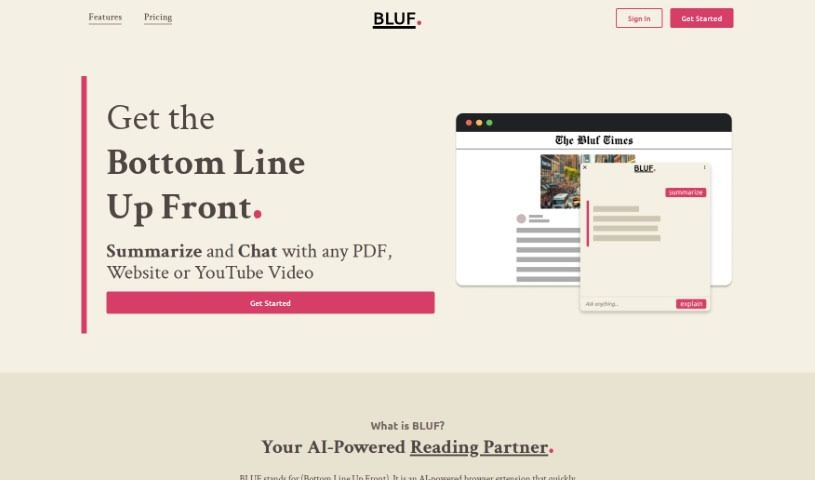
Screenshot of Bluf

Bluf

Discover what Bluf is and how to use it in 2025. We'll explore its features, compare it to other summarizers, and show you how to get the most out of it.

Screenshot

What is Bluf?

Bluf is a handy AI-powered browser extension that’s all about getting you the main points, fast. It is your personal summarizer for websites, PDF documents, or even YouTube videos. It’s designed to help you cut through the noise and really boost your understanding by pulling out the key highlights. It can take complicated ideas and break them down into explanations that are easy to digest. Plus, you can quickly get to the summarized info you need. Bluf works with all sorts of content – websites, PDFs, YouTube videos, and even files you have saved locally. This makes it a super versatile tool for soaking up information from wherever you find it.

So, who can really benefit from Bluf? Well, lots of people! Forum moderators can use it to find key points that spark better discussions. Researchers can quickly get the gist of academic papers. Students can grasp complex concepts more easily. Journalists can speed up their learning process. Social media managers can pull out key ideas for creating engaging posts. And busy professionals can save precious time by getting quick summaries of emails, reports, or news.

Bluf is available for Chrome and Firefox. They really care about your privacy, so they collect usage data but don’t store what you actually search for. They also have a 30-day data retention policy. If you want to know more, you can always reach out to their support team at [email protected].

Who created Bluf?

Bluf was actually developed by the same team behind an AI assistant focused on analyzing web pages. This tool, which you can get as an add-on for Chrome and Firefox, is built to give you concise answers, summaries, and explanations from the web pages you visit. It’s a great way to help you navigate through all the information out there, delivering what you need in a way that’s easy to understand and digest. The team behind Bluf really prioritizes user privacy, making sure your data is kept confidential. They do this by only collecting usage data and not storing the actual content of your queries. If you need more help or have questions, you can always contact their support team via email at [email protected].

What is Bluf used for?

Bluf is incredibly versatile and can help a wide range of people in different ways:

  • Forum Moderators: You can pinpoint key discussion points to encourage more meaningful conversations and boost community engagement.
  • Researchers: Quickly grasp the essential concepts from complex academic papers, making your analysis more thorough.
  • Students: Get a handle on the core ideas from academic papers without getting bogged down in details.
  • Journalists: Understand the key concepts within intricate academic texts to improve your learning and study efficiency.
  • Social Media Managers: Extract the main ideas needed to craft engaging posts and streamline your content promotion efforts.
  • Busy Professionals: Summarize emails, reports, or news articles efficiently to stay informed and manage your time better.

Essentially, Bluf helps you get to the heart of any content, saving you time and improving your comprehension, no matter your role.

Who is Bluf for?

Bluf is a great tool for anyone who needs to process information quickly and efficiently. This includes:

  • Forum Moderators
  • Researchers
  • Students
  • Journalists
  • Social media managers
  • Busy Professionals

If you’re dealing with a lot of text and need to understand it faster, Bluf is likely for you.

How to use Bluf?

Getting started with Bluf is pretty straightforward. Here’s a simple step-by-step guide:

  1. Find Your Content: First, head to the website, PDF, or YouTube video you want summarized.
  2. Activate Bluf: You can do this in a few ways: right-click on the text you’re interested in, click the toolbar icon for the extension, or use the handy keyboard shortcut Shift + Alt + B.
  3. Get the Main Idea: Just click ‘summarize’ or ‘explain’ to get the bottom line right away.
  4. Ask More: If you want to dive deeper, you can ask follow-up questions about the content.

Bluf is really designed to summarize and explain content quickly and efficiently. It works smoothly across websites, PDFs, YouTube videos, and even files you have stored on your computer. The tool lets you pull out the main highlights, turn complex ideas into easy-to-understand information, and even ask follow-up questions to really get a deeper understanding. Bluf supports Chrome, Firefox, Edge, and Opera browsers, so it’s accessible to a lot of users. It’s perfect for forum moderators, researchers, students, journalists, social media managers, and busy professionals. Bluf also puts a big emphasis on user privacy, collecting only usage data and not storing the actual content of your queries. If you need any more help, you can always reach out to the Bluf support team via email at [email protected].

Related AI Tools

Discover more tools in similar categories that might interest you

Academic Help Free Essay Generator

Education Academic Writing
Learn More

Stay Updated with AI Tools

Get weekly updates on the latest AI tools, trends, and insights delivered to your inbox

Join 25,000+ AI enthusiasts. No spam, unsubscribe anytime.