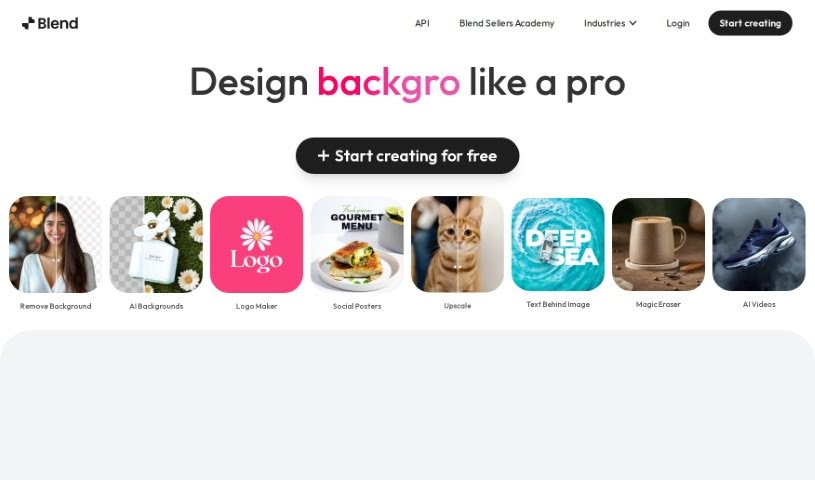
Screenshot of Blend

Blend

Discover what Blend is and how to use it effectively in 2025. Explore its features, compare it with other photo editors, and see how it can boost your sales and online presence.

Screenshot

What is Blend?

Blend is a really neat tool that uses AI to quickly remove backgrounds from images and make your product photos look amazing. It’s designed to make things easy for entrepreneurs who want to boost their sales and improve their online look with professional-quality visuals. You get automatic background removal, the ability to swap out backgrounds, tons of templates, and features specifically for social media graphics and product shots. Plus, it helps optimize your images for search engines, resizes them for different platforms, and even has a ‘magic resize’ feature.

Blend’s AI makes editing a breeze, especially background removal, and it helps your images get noticed online. You can play around with lots of fonts, backdrops, and templates to create designs that really stand out on any platform. They also take user data privacy seriously and offer resources like the Blend Seller Academy to help your business grow and learn new skills. Essentially, it simplifies creating professional product photos and designs for e-commerce and social media, making it a super valuable tool for anyone wanting to up their online game.

Who created Blend?

Vishwanath Kollapudi founded Blend and launched it on March 13, 2022. He’s the Co-Founder & CEO. Blend’s whole mission is to build products where AI meets creativity, aiming to empower e-commerce sellers by helping anyone become a pro. The company has support from some great investors and is run by a team that’s really passionate about building cool stuff.

What is Blend used for?

Blend is great for a bunch of things:

  • Swapping out backgrounds
  • Removing backgrounds automatically
  • Making social media graphics look sharp
  • Optimizing photos for products
  • Creating SEO-friendly descriptions
  • Resizing designs for different platforms
  • Exporting high-quality cutouts
  • Using a magic resize feature
  • Generally improving product photos and social graphics
  • Crafting designs for e-commerce and social media
  • Boosting your overall online presence
  • Quickly removing backgrounds from multiple photos at once
  • Using optimized templates for social graphics, product photos, and SEO content
  • Taking advantage of the magic resize feature for various platforms
  • Accessing over 100 font styles and backdrops
  • Resizing and cropping images for places like Instagram and Etsy
  • Creating high-definition cutouts and exporting them
  • Getting training through the Blend Seller Academy to help your business grow
  • Choosing from thousands of templates
  • Enhancing product photos and social graphics for e-commerce and social platforms
  • Using optimized templates specifically for social graphics
  • Using optimized templates specifically for product photos
  • Using SEO-optimized templates
  • Picking from more than 100 font styles
  • Using over 100 backdrops
  • Getting HD cutouts and using the export feature
  • Using thousands of customizable templates
  • Resizing designs for all sorts of platforms
  • Helping your sales grow

Who is Blend for?

Blend is a helpful tool for:

  • Graphic Designers
  • ML Engineers
  • Community Manager Consultants
  • Design and Community Associates
  • Community Associates
  • Content Associates

How to use Blend?

Using Blend is pretty straightforward. Here’s a simple guide:

  1. Upload Your Image: First, upload the picture you want to work on. Blend’s AI will then automatically take care of removing the background for you.
  2. Replace the Background: If you like, you can easily swap out the original background for something else from the options Blend provides.
  3. Pick a Template: Blend has over 500 templates ready to go, perfect for social graphics, product photos, and SEO-friendly text. Just pick the one that fits what you need.
  4. Use the Magic Resize: Don’t forget to try the ‘magic resize’ feature! It’s great for adjusting your design to fit different platforms perfectly, without losing any quality.
  5. Customize It: You can really make your designs your own with Blend’s collection of over 100 font styles and backdrops.
  6. Export in HD: Grab your finished designs as high-definition cutouts using the HD cutout and export feature.
  7. Access Anywhere: You can use Blend on your phone via the App Store or Play Store, or just hop onto the web – it’s super convenient.
  8. Boost Your Online Presence: If you’re an entrepreneur looking to increase sales and make your online presence shine, Blend’s Image Background Remover is a fantastic asset.
  9. Your Data is Safe: Blend makes sure your user data is kept private, following their privacy policy to ensure everything is confidential and secure.

By following these steps, you can easily create professional, eye-catching images with Blend, which will help boost your online presence and drive sales growth.

Related AI Tools

Discover more tools in similar categories that might interest you

123RF AI Image Generator

Creative Image Generation
Learn More

Stay Updated with AI Tools

Get weekly updates on the latest AI tools, trends, and insights delivered to your inbox

Join 25,000+ AI enthusiasts. No spam, unsubscribe anytime.