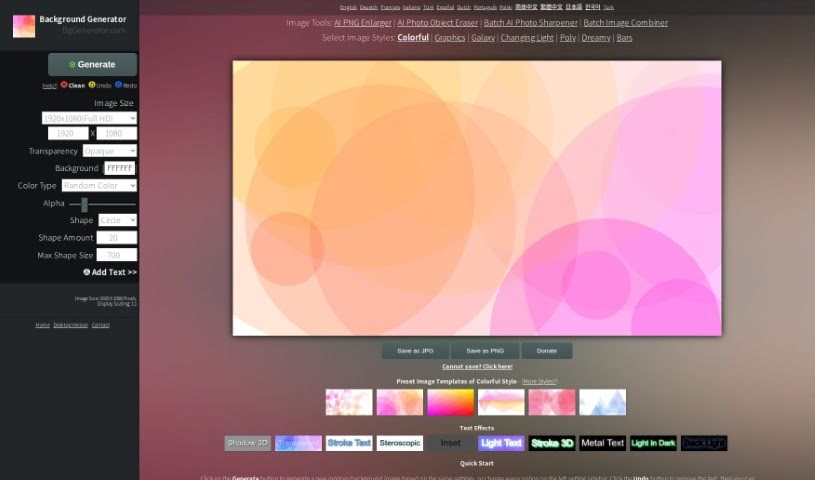
Screenshot of Bg Generator

Bg Generator

Discover what Bg Generator is and how to use it effectively in 2025. Explore its features and see how it stacks up against other photo editors.

Screenshot

What is Bg Generator?

The Background Generator, found at BgGenerator.com, is a handy online tool that lets you create all sorts of unique and creative background images. Whether you need something for your computer wallpaper, a blog illustration, a commercial background, or a poster, this tool has you covered. It offers a variety of styles and templates to help you make really outstanding images. You can also tweak things like the image size and the output format. Plus, if you want to add text, you can do that too, with lots of different text effects to play with.

What’s great is that it all happens right in your web browser. This means your privacy is protected, and it works on pretty much any device or operating system you use – no fuss, no uploads needed. It’s super user-friendly, offering features like undo/redo, transparency settings for those backgrounds, easy color customization, and even shape generation. The Background Generator supports both regular opaque PNGs and transparent PNGs, giving you high-quality output images that are perfect for both personal projects and commercial use. And the best part? It’s completely free, supports many languages, and you don’t even need to register or give an email address. It’s designed to be convenient and accessible for everyone.

Who created Bg Generator?

Bg Generator first launched on December 20, 2023. The main idea behind it was to offer a simple way to create unique background images for all sorts of uses – think wallpapers, graphic designs, posters, and more. It was developed by the team behind BgGenerator.com, a company focused on providing free online image creation services. This platform is entirely web-based, meaning no installations are necessary, which really helps keep your information private and makes it easy to use on different devices and operating systems.

What is Bg Generator used for?

  • Create 100% Unique Images: It uses a random machine algorithm to generate truly one-of-a-kind visuals.
  • Generate 7 Different Styles: You get to choose from seven distinct styles for outstanding image creation.
  • Versatile Use: Perfect for backgrounds, general design work, wallpapers, posters, commercial projects, and much more.
  • Support for Large Resolutions: It can generate images at extremely high resolutions.
  • Online Creation: Everything happens in your browser – no installation required.
  • Add Text & Effects: You can easily add text to your images and apply various text effects.
  • Opaque & Transparent PNGs: Supports generating images in both opaque and transparent PNG formats.
  • High-Quality Output: Delivers the best quality JPG/JPEG image format.
  • Cross-Platform Compatibility: Works seamlessly on all popular devices (PCs, Macs, iPhones, iPads, Android phones) and operating systems (Windows, Mac, iOS, Android).
  • Free for All: It’s completely free for both personal and commercial use.

Who is Bg Generator for?

  • Graphic designers
  • Artists
  • Illustrators
  • Web designers
  • Content creators
  • Marketing professionals
  • Anyone needing commercial background images

How to use Bg Generator?

Using the Background Generator is pretty straightforward. Just follow these simple steps to create your perfect background:

  1. Pick Your Size: First, decide on the canvas and output background image size. You can pick from a list of presets or enter your own custom dimensions.
  2. Choose Your Colors: You have two options here: select “Customized Color” if you have a specific shade in mind, or choose “Random Color” to let the tool surprise you with a random color generation.
  3. Adjust Shapes, Amount, and Size: Play around with these settings to influence the output images and create different visual effects.
  4. Generate Your Image: Once you’re happy with your selections, just hit the “Generate” button. If you don’t like what you see, you can easily remove the current image and generate a new one by clicking the “Clean” button.
  5. Save Your Creation: Finally, save your image in either JPG or PNG format. If you need a transparent background, make sure to set “Transparency” to “Transparent” before saving it as a PNG file.

More Cool Features:

  • Want to add text? Use the “Add Text” feature found on the left sidebar to personalize your image further.
  • Your privacy is a top priority. The tool runs entirely within your browser, so you never have to upload anything.
  • You can really customize your text with effects like shadow, blur, and lights.
  • It’s compatible with all the popular devices and operating systems out there, making it super accessible for everyone.

By following these steps, you’ll be able to create unique and personalized background images for all sorts of projects with the Background Generator tool.

Related AI Tools

Discover more tools in similar categories that might interest you

123RF AI Image Generator

Creative Image Generation
Learn More

Stay Updated with AI Tools

Get weekly updates on the latest AI tools, trends, and insights delivered to your inbox

Join 25,000+ AI enthusiasts. No spam, unsubscribe anytime.