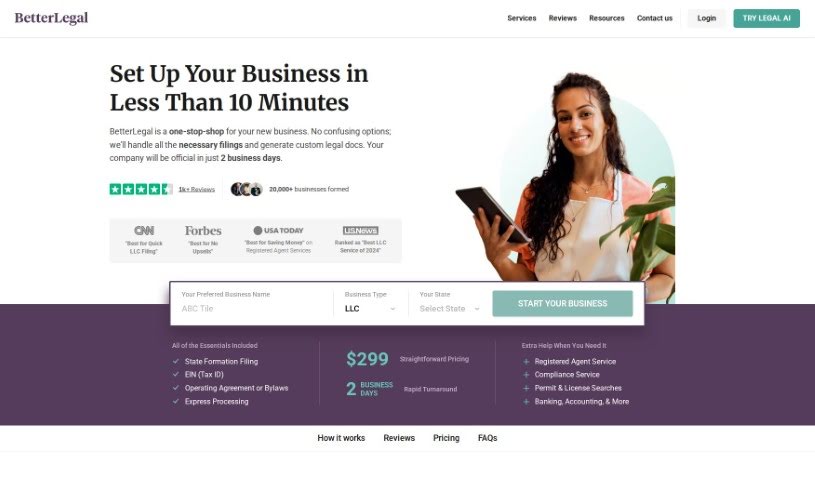
Screenshot of BetterLegal

BetterLegal

Discover what BetterLegal is and how to use it effectively in 2025. We'll explore its features and see how it stacks up against other legal tools.

Screenshot

What is BetterLegal?

BetterLegal Assistant is a handy Chrome extension that uses AI to make tough legal language easy to understand. It is your personal translator for legal docs! It’s built for folks like tech pros, investors, entrepreneurs, and really anyone who needs to get a grip on legal texts – you know, things like contracts, terms of service, and privacy policies. It even has a fun ‘Pirate Mode’ for a more playful translation experience. Just a heads-up, though: it’s designed to simplify, not to give you specific legal advice for your unique situation. While it works hard to be accurate, it can’t guarantee 100% perfect translations, and sometimes super specialized legal jargon might still be a bit tricky for it to fully grasp. It also doesn’t account for regional differences in legal terms.

Who created BetterLegal?

BetterLegal was actually started by a company called BetterLegal Inc., which officially launched on April 4, 2023. They’re aiming to be your go-to spot for setting up a new business, handling all the paperwork and creating custom legal documents for you. Their whole idea is to make starting a company straightforward and efficient. BetterLegal Inc. offers services like filing for state formation, getting your Tax ID (EIN), and creating operating agreements or bylaws, among other things. They’ve also developed the BetterLegal Assistant, that AI-powered Chrome extension we just talked about. It’s designed to translate complex legal language into plain English, making it super helpful for tech professionals, investors, entrepreneurs, and anyone who just wants to understand legal documents without a headache.

What is BetterLegal used for?

  • It helps tech professionals really get what legal documents are saying.
  • Investors can use it to decipher tricky legal texts.
  • Entrepreneurs find it a lifesaver for understanding contracts, terms of use, and privacy policies.
  • Basically, it makes legal language accessible to everyone, even if you’re not a lawyer.
  • It translates complex legal text into simpler, more digestible terms.
  • You get explanations for key clauses, terms, and conditions within documents.
  • There’s a fun ‘Pirate Mode’ for a more engaging translation experience!
  • It uses AI to analyze legal text, breaking down and simplifying complex language.
  • Crucially, it works to preserve the original intent and meaning of the legal documents it translates.
  • You can find it as a Google Chrome extension.
  • It’s a great fit for tech professionals, investors, entrepreneurs, and anyone needing to understand documents like contracts, terms of use, and privacy policies.
  • It handles all sorts of legal documents, including contracts, terms of use, and privacy policies.
  • It makes understanding legal documents easier by simplifying complex legal language into terms you can grasp.
  • It’s available as a Chrome browser extension.
  • You can use it for free to start, with 50 initial credits – each credit lets you explain one legal text.
  • The ‘Pirate Mode’ is a unique feature that translates legal text into pirate-speak for a bit of fun.
  • It helps you pinpoint key clauses, terms, and conditions in legal documents.
  • It uses AI and large language models to break down and simplify legal language.
  • Just remember, it doesn’t offer specific legal advice for your unique situation.
  • It’s great for deciphering legal jargon and complex phrases.
  • It helps you understand legal documents like contracts, terms of use, and privacy policies.
  • It decodes difficult legal jargon and complex terminology.
  • You won’t need a professional legal consultation for basic understanding.
  • It’s perfect for tech professionals, investors, and entrepreneurs.
  • It translates complex legal language into simpler terms.
  • It helps you identify key clauses in legal documents.
  • It provides accessible explanations for legal texts.
  • It makes navigating legal language much easier.
  • It offers clear explanations.
  • It preserves the original intent and meaning of legal documents.
  • It transforms complex legal text into simpler, more understandable language.
  • It assists tech professionals, investors, entrepreneurs, and individuals in understanding legal documents like contracts, terms of use, and privacy policies.
  • It simplifies legal documents by decoding difficult jargon and complex terminology.
  • It offers a unique ‘Pirate Mode’ for a fun and engaging translation experience.
  • It’s important to note that it doesn’t provide specific legal advice tailored to unique circumstances.
  • It preserves the original intent and meaning of legal documents through its translations.
  • It applies AI technology and large language models to break down and simplify legal language.
  • It generates clear, understandable explanations to help you identify key clauses, terms, and conditions.
  • It works as a Chrome extension on the Google Chrome browser.
  • New users get 50 free credits to start with.

Who is BetterLegal for?

  • Tech professionals
  • Investors
  • Entrepreneurs

How to use BetterLegal?

To get the most out of BetterLegal Assistant, here’s a simple guide:

  1. Who Can Use It: BetterLegal Assistant is perfect for tech professionals, investors, entrepreneurs, and really anyone who wants to get a handle on legal documents like contracts, terms of use, and privacy policies.
  2. Types of Legal Texts: The tool is designed to handle a variety of legal documents, including contracts, terms of use, and privacy policies. It excels at simplifying complex legal language so you can understand it better.
  3. Platforms: You can easily access BetterLegal Assistant as a Google Chrome extension, meaning it works on any device where you use Chrome.
  4. Free Usage: It’s free to start using! New users get 50 free credits, and each credit allows you to get one explanation of a legal text.
  5. Pirate Mode: Want to have some fun? There’s a unique ‘Pirate Mode’ that translates the simplified legal text into pirate language, making document review more engaging and entertaining.
  6. Earning More Credits: You can earn additional credits by inviting friends to try the extension or by sharing your feedback on the Chrome Web Store.
  7. No Legal Advice: Keep in mind, it doesn’t offer specific legal advice tailored to your personal cases. Its main purpose is to simplify legal texts for general understanding.
  8. Technology Used: BetterLegal Assistant uses artificial intelligence, specifically large language models, to analyze and simplify those complex legal texts.
  9. Privacy Policy: Your interactions with the tool are kept private and secure under BetterLegal’s Privacy Policy.
  10. Identifying Key Clauses: It helps you spot important clauses, terms, and conditions by simplifying legal language into understandable terms, making it easier to recognize critical parts of any document.

By following these steps, you can effectively use BetterLegal Assistant to simplify legal documents and boost your understanding, even without needing specific legal expertise.

Related AI Tools

Discover more tools in similar categories that might interest you

Stay Updated with AI Tools

Get weekly updates on the latest AI tools, trends, and insights delivered to your inbox

Join 25,000+ AI enthusiasts. No spam, unsubscribe anytime.