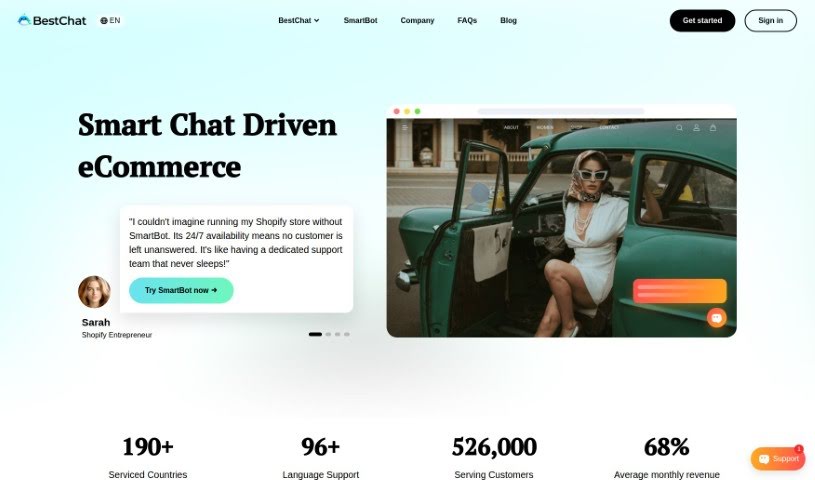
Screenshot of BestChat

BestChat

Discover what BestChat is and how to use it effectively in 2025. We'll explore its features and see how it stacks up against other sales tools.

Screenshot

What is BestChat?

BestChat is a really flexible chat tool that’s great for improving customer support and giving your sales a boost. You can use it across different ways to talk to people, like live chat on your website, email, and even AI chatbots. It’s designed to handle multiple chat channels easily, keep an eye on who’s visiting your site, and connect with popular messaging apps like Facebook, Twitter, WhatsApp, and email. Plus, BestChat includes a solid CRM system to help you gather and understand customer info. You also get tools for analyzing data, tracking traffic, and seeing how well your agents are doing. It can even connect with your other systems, letting you create custom marketing plans and offer unique services. Basically, it’s a smart way to make your customer support and sales efforts work better.

Who created BestChat?

BestChat, a handy chat tool, first came out on June 7, 2021. It was developed by a team, with its founder leading the way. The company’s main goal is to make customer support and sales engagement smoother by using various communication methods. Think web live chat, email, and an AI chatbot system. BestChat offers features like support for multiple chat channels, visitor tracking, and easy integration with popular messaging platforms. It also has a strong CRM system to help analyze customer information. On top of that, you’ll find features like automatic chat distribution, visitor showcases, ways to identify members, and support for both iOS and Android apps. BestChat really aims to help businesses improve how they handle customer support and sales.

What is BestChat used for?

BestChat helps you with a lot of things:

  • Providing great customer service efficiently.
  • Letting customers track their orders easily.
  • Making returns and exchanges simple.
  • Saving you a remarkable amount of time.
  • Connecting with popular messaging apps like Facebook, Twitter, WhatsApp, and Email.
  • Integrating with your Customer Relationship Management (CRM) system and providing analytics.
  • Analyzing data, tracking website traffic, and evaluating how well your agents perform.
  • Automatically distributing chats among your team.
  • Showing you detailed information about your visitors.
  • Connecting with your existing systems, like ticketing, order management, and logistics.
  • Creating personalized marketing strategies and offering unique services.
  • Managing customer relationships (CRM).
  • Boosting your sales engagement.
  • Supporting multiple chat channels.
  • Keeping track of who visits your site.
  • Integrating with messaging platforms like Facebook, Twitter, WhatsApp, and Email.
  • Analyzing data and tracking traffic.
  • Evaluating agent performance.
  • Offering advanced features like automatic chat distribution.
  • Connecting with multiple systems for custom marketing and services.
  • Giving real-time updates on orders.
  • Sending notifications about delivery status.
  • Tracking visitors.
  • Integrating with your CRM system to analyze customer information.
  • Helping reduce your agents’ average time spent on tasks by 87%.
  • Tracking visitors.
  • Integrating with messaging platforms like Facebook, Twitter, WhatsApp, and Email.
  • Integrating with your CRM system for collecting and analyzing customer information.
  • Providing over 30 customer service metrics to help you improve quality.
  • Offering advanced features like automatic chat distribution, visitor showcases, identifying member information, and support on mobile devices.

Who is BestChat for?

BestChat is a great tool for:

  • Customer Support Representatives
  • Sales professionals
  • Sales Representatives
  • Marketing Managers
  • CRM specialists
  • Business owners

How to use BestChat?

Here’s how to get the most out of BestChat:

  1. Sign Up and Log In:
    • First, head over to the BestChat website at https://www.bestchat.com/ and sign up for an account.
    • Then, use your login details to access the BestChat platform.
  2. Set Up Communication Channels:
    • Take a look at the different ways you can communicate, such as web live chat, email, and the AI-robot chat system.
    • Connect popular messaging platforms like Facebook, Twitter, WhatsApp, and Email so you can chat live with potential customers.
  3. Utilize CRM Integration:
    • Make good use of the strong CRM system built into BestChat. It helps you collect and analyze customer information, making management much better.
    • Use features like data analysis, traffic tracking, and agent performance evaluation to boost your customer service quality.
  4. Explore Advanced Features:
    • Check out the advanced features, including how chats are automatically distributed, detailed visitor showcases, and ways to identify member information.
    • You can easily access the tool on your phone or tablet through the iOS and Android apps.
  5. Integrate with Existing Systems:
    • Connect BestChat with systems you already use, like ticketing, order management, or logistics, so you can create custom marketing strategies and offer unique services.
  6. Optimize Customer Support and Sales Engagement:
    • Use the more than 30 customer service indexes BestChat provides to really improve your service quality.
    • Make your customer support and sales engagement processes even better by using BestChat’s efficient features.

By following these steps, you’ll be able to use BestChat effectively to simplify your customer support and sales efforts, and ultimately improve your business’s overall performance.

Related AI Tools

Discover more tools in similar categories that might interest you

Stay Updated with AI Tools

Get weekly updates on the latest AI tools, trends, and insights delivered to your inbox

Join 25,000+ AI enthusiasts. No spam, unsubscribe anytime.