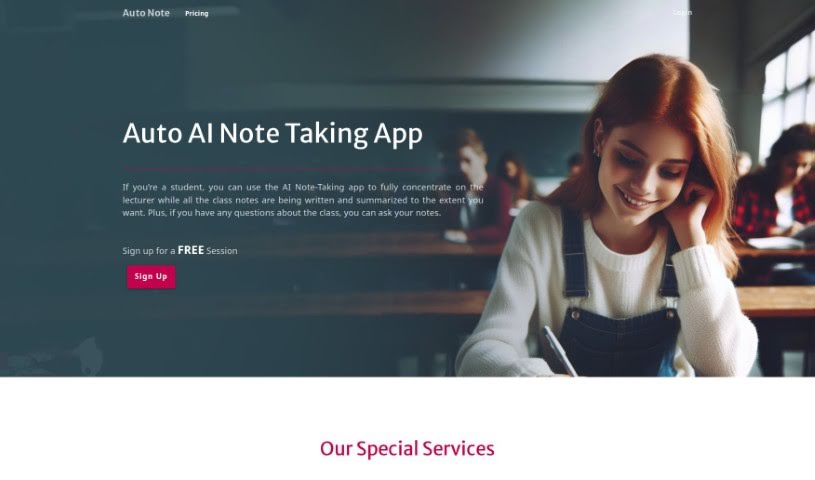
Screenshot of Auto Note

Auto Note

Discover what Auto Note is and how to use it to boost your learning in 2025. We'll cover its features, compare it to other student tools, and show you exactly how to get the most out of it.

Screenshot

What is Auto Note?

Auto Note is an AI-powered service designed to help students learn more effectively. It is your personal note-taker during lectures. It captures everything the professor says, transcribes it, and turns it into written notes. This way, you can really focus on understanding the material instead of worrying about writing everything down. You can even adjust how detailed the notes are, depending on what you need for your studies or how much time you have. After the lecture, you can ask questions about the topics covered, get a quick summary of the whole class, or dive into detailed notes for a deeper understanding. It’s a smart way to make sure you don’t miss any important points and to get the information in a format that works best for you. Auto Note really helps you concentrate during class and makes studying much more efficient, especially for e-learning.

Who created Auto Note?

Auto Note was developed by an AI-powered note-taking service specifically for students. Launched on January 9, 2024, it’s built to boost learning efficiency. The service offers features like automatic lecture transcription, content summarization, and customizable detail levels to suit various study needs. You can choose from different subscription options: Base, Popular, and Elite. The company behind Auto Note is dedicated to improving how students learn and study by providing real-time lecture transcription and comprehensive note generation.

What is Auto Note used for?

  • It automatically transcribes your lectures.
  • It summarizes what your professor says.
  • You can choose how much detail you want in your notes.
  • It lets you revisit lectures later.
  • It provides deeper explanations of topics.
  • It captures examples the professor shares.
  • This ensures you don’t miss any key points.
  • It helps you concentrate better during class.
  • It includes a handy ‘ask’ function for questions.
  • You get a summary of the entire class.
  • It significantly boosts your study efficiency.
  • It’s a great tool for e-learning.
  • It supports overall learning enhancement.
  • It captures lecture content completely.
  • It aids in understanding lectures better.
  • You can easily access lecture details.
  • It caters to your specific study needs.
  • It offers effective assistance for education.

Who is Auto Note for?

  • Students
  • Teachers
  • Educators
  • Professors

How to use Auto Note?

Here’s a simple, step-by-step guide to using Auto Note:

  1. Sign Up: First, create an account on the Auto Note website to get started.
  2. Choose Your Plan: Pick the subscription plan that best fits what you need – Base, Popular, or Elite.
  3. Attend Your Lecture: During your lecture, simply use Auto Note. Focus on listening, and the tool will handle transcribing and summarizing the content for you.
  4. Customize Detail Level: You can adjust how detailed the notes are. This lets you match them to your study needs or how much time you have.
  5. Ask Questions: After the lecture, use the ‘ask’ feature to get answers to any questions you have about the material. It’s great for digging deeper.
  6. Access Summaries: If you need a quick overview, you can get a condensed summary of the entire class, usually in just a couple of paragraphs.
  7. Enhance Study Efficiency: By letting Auto Note take care of note-taking, you can concentrate fully on the lecture, which really improves how efficiently you study.
  8. Review Anytime: Your notes are saved, so you can access them whenever you need to revise. This includes all the professor’s examples and key points.
  9. Prepare for Exams: Use the detailed or summarized notes to get ready for your exams in a more focused way.
  10. Benefit from Special Services: Take advantage of extra features like getting detailed notes, asking for specific explanations, and choosing how you want to view your notes.
  11. Utilize Versatile Features: Explore everything Auto Note offers, like real-time transcription, summarization, revisiting specific points, and detailed note generation to really support your e-learning.
  12. Stay Engaged: Keep the application open and stay logged in. This ensures you have secure access to your notes and all the personalized features.
  13. Connect on Social Media: Follow Auto Note on platforms like Twitter. That’s a good way to stay updated on new features and get extra information.

By following these steps, you’ll be able to use Auto Note effectively to make your learning experience better and study more efficiently.

Related AI Tools

Discover more tools in similar categories that might interest you

Academic Help Free Essay Generator

Education Academic Writing
Learn More

Stay Updated with AI Tools

Get weekly updates on the latest AI tools, trends, and insights delivered to your inbox

Join 25,000+ AI enthusiasts. No spam, unsubscribe anytime.