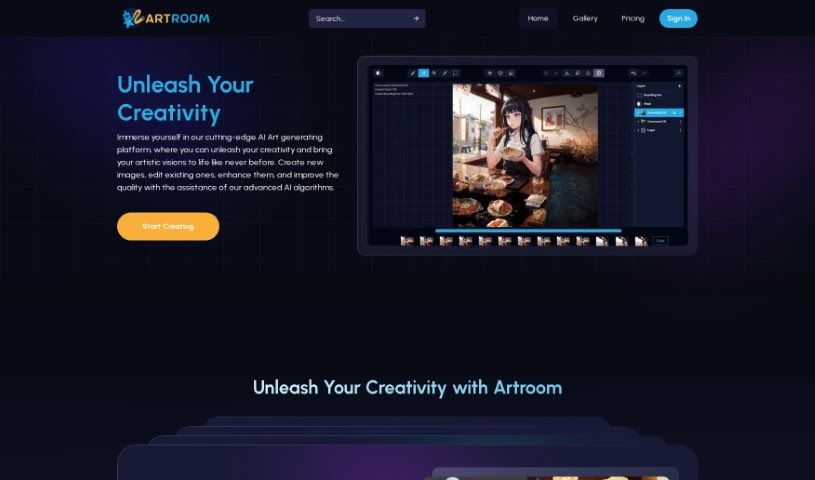
Screenshot of ArtRoom AI

ArtRoom AI

Discover what ArtRoom AI is and how to use it effectively in 2025. We'll explore its features and see how it stacks up against other AI image generators.

Screenshot

What is ArtRoom AI?

ArtRoom AI is a platform designed to help you create art using artificial intelligence. It’s a place where you can really let your creativity flow and bring your artistic ideas to life with a little help from AI. You can make completely new art, generate reference photos, tweak your art using layers, play around with different characters and styles, and even get more precise control over your creations with something called ControlNets. Plus, ArtRoom AI features a gallery filled with inspiring pieces from talented artists all over the world. This gives you a wide variety of artistic styles and mediums to draw inspiration from. The tool itself uses a Graphical User Interface (GUI), meaning it’s easy to navigate without needing any coding knowledge. It runs on Stable Diffusion technology, which is what powers the AI art generation. ArtRoom AI is specifically for Windows computers and the application file is about 200MB. You can download it from the official website, where you’ll also find a blog with updates, a section for extra downloads, and a secure way to buy artwork.

Who created ArtRoom AI?

An individual, whose name isn’t specifically mentioned on the website, created Artroom. The platform first launched on May 11, 2024. It offers a user-friendly Graphical User Interface (GUI) tool, making it simple for anyone to generate AI artwork without needing to code. It’s built on Stable Diffusion technology and runs on Windows systems, with an executable file size of roughly 200MB. You can also find a blog, helpful resources for AI art, and a secure checkout service for purchasing art.

What is ArtRoom AI used for?

  • Create AI Art: Use AI to generate original artwork, create reference photos, or just see what the AI comes up with.
  • Full Service Painting with Layers: You get full painting capabilities with layers, giving you more control over how the AI generates your art.
  • Mix and Match Characters and Styles: Easily combine your favorite characters and styles using Loras, which are integrated with CivitAI for quick access.
  • Take Control with ControlNets: Focus on specific parts of an image to guide the AI, allowing for more precise variations and control.
  • Discover Inspiring Creations: Browse a gallery of amazing artwork created by talented artists worldwide.
  • Access Additional Features: Check out the blog for updates on AI art, find resources in the download section, and use the secure checkout to buy artwork.
  • Download Resources: Get extra materials related to ArtRoom AI from the website.
  • Generate Art from Input: Create artwork by simply providing an image or a text prompt to the application.
  • Purchase Artworks: Buy art you love through the secure checkout service on the ArtRoom AI website.
  • Stay Updated: Keep up with the latest news and updates on AI-generated art via the ArtRoom AI blog.
  • AI Art Creation: Generate original art using powerful AI algorithms.
  • Image Editing: Edit existing images and improve their quality.
  • Control Generative Process: Adjust and manage the AI’s creation process using layers.
  • Style and Character Mixing: Combine favorite characters and styles with Loras.
  • Precise Image Control: Use ControlNets to focus on specific image areas.
  • Explore Global Art: View inspiring creations from artists worldwide.
  • AI Art News: Catch up on the latest AI art trends on the blog.
  • Secure Art Purchases: Buy artworks safely through ArtRoom AI.
  • Resource Downloads: Get additional ArtRoom AI-related resources.
  • Easy Art Generation: Create AI art using image prompts without needing to code.
  • Original Art Generation: Create original art, use AI for reference photos, or discover new creations.
  • Layered Painting: Control the AI generative process and adjust art with layers.
  • Unlimited Loras: Mix and match favorite characters and styles using Loras.
  • ControlNet Focus: Use ControlNets to focus on specific image parts, maintain poses, outlines, or depth maps.
  • Inspirational Gallery: Discover a wide range of artistic styles, mediums, and subjects.
  • Artroom AI Blog: Stay updated on the latest in AI-generated art.
  • Downloadable Resources: Access additional resources related to ArtRoom AI.
  • Secure Checkout: Purchase artworks securely through ArtRoom AI.
  • Gallery Browsing: Find plenty of inspiration in the captivating gallery.
  • Accessible GUI: Create AI-generated artwork without needing coding skills using the easy-to-use GUI tool.

Who is ArtRoom AI for?

  • Artists
  • Graphic designers
  • Illustrators
  • Digital creators
  • Designers
  • Creators
  • Art enthusiasts
  • Creatives
  • Painters

How to use ArtRoom AI?

Here’s how you can get started with ArtRoom AI:

  1. Download and Install:
    • First, head over to the official ArtRoom AI website and download the executable file. It’s about 200MB and works on Windows.
    • Once downloaded, run the file to start the installation.
  2. Open the Application:
    • After it’s installed, just launch ArtRoom AI on your computer.
  3. Create AI Art:
    • You can use the AI to generate brand new art or create reference images. Feel free to explore and edit images, improve their quality, and make adjustments as you like.
  4. Full Service Painting with Layers:
    • Take charge of the AI’s generation process by painting on different layers, which lets you customize your artwork.
  5. Unlimited Loras:
    • Mix and match different characters and styles using Loras. ArtRoom supports model creators who are approved on AI Generative services.
  6. Take Control with ControlNets:
    • Make your creations even better by using ControlNets to focus on specific parts of your image. You can experiment with things like pose, outlines, and depth maps.
  7. Discover Inspirational Creations:
    • Take a look at the gallery, which features a wide variety of artworks from talented artists around the world – it’s a great source of inspiration.
  8. Additional Features:
    • You can visit the blog for the latest news on AI art, download useful resources, and use the secure checkout if you decide to purchase any artworks.
  9. Image Input and Generation:
    • Simply input an image or a text prompt into the application, and ArtRoom AI will generate artwork based on what you provide.
  10. Purchase Artworks:
    • If you find an artwork you really like, you can buy it using the secure checkout service available on the ArtRoom AI website.

ArtRoom AI provides a user-friendly Graphical User Interface (GUI), making it easy for both beginners and experienced users to create AI-generated art without needing any coding skills. By following these steps, you can really unleash your creativity and use advanced AI algorithms to bring your artistic visions to life.

Related AI Tools

Discover more tools in similar categories that might interest you

123RF AI Image Generator

Creative Image Generation
Learn More

Stay Updated with AI Tools

Get weekly updates on the latest AI tools, trends, and insights delivered to your inbox

Join 25,000+ AI enthusiasts. No spam, unsubscribe anytime.