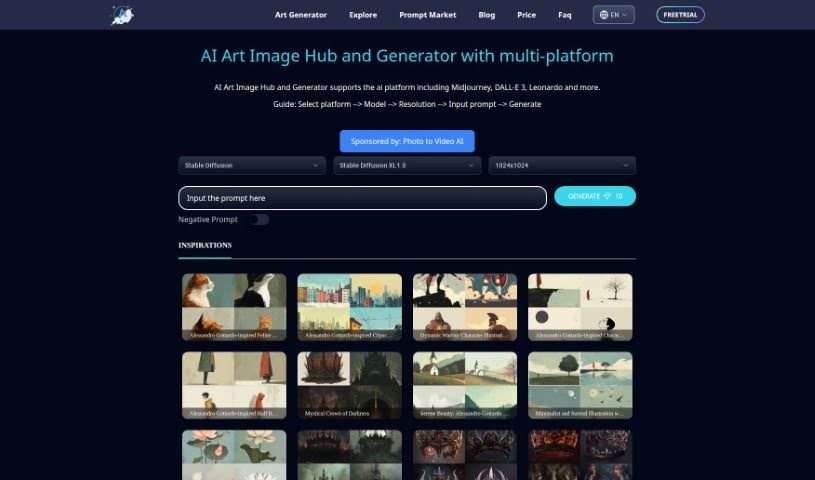
Screenshot of Artiversehub Ai

Artiversehub Ai

Discover Artiversehub AI in 2025! Learn what it is, how to use it effectively, explore its features, and see how it stacks up against other AI image generators.

Screenshot

What is Artiversehub Ai?

ArtiverseHub AI is an online tool that lets you create original images just by typing in what you want. It’s pretty neat because it works with several different AI platforms, including DALL·E (from ChatGPT), Leonardo.ai, and Stability.ai, among others. The whole idea is to make it super easy for you to get the images you need, and they’re planning to add even more AI models in the future so you can really tailor the experience to your preferences. You can expect the images to be high quality, which is great for all sorts of things – whether it’s for your personal projects, designing something for a business, creating marketing materials, getting product photos, or even making concept art. It’s really flexible for creative work, and they’re working on letting you pick your favorite AI model for generating images.

Who created Artiversehub Ai?

Artiversehub Ai was brought to life by a team of developers who are really passionate about creating innovative tools that use AI for image generation. While the founders prefer to remain anonymous, they’ve built a platform that supports popular AI models like DALL·E, Leonardo.ai, and Stability.ai. Their main focus is on making the platform easy to use and offering ways for users to personalize their experience down the line. Artiversehub Ai aims to deliver high-quality images that are useful across many creative areas, such as marketing, design, and art.

What is Artiversehub Ai used for?

Artiversehub AI is incredibly versatile and can be used for a wide range of creative tasks:

  • Fashion Design: Bring your clothing concepts to life.
  • Advertising: Create eye-catching visuals for campaigns.
  • Interior Design: Visualize spaces and decor ideas.
  • Personal Projects: Generate unique art for your own enjoyment.
  • Concept Art: Develop visual ideas for stories, games, or films.
  • Marketing Materials: Produce graphics for brochures, social media, and more.
  • AI Art Generation: Explore the possibilities of AI-created artwork.
  • Product Photography: Create realistic or stylized images of products.
  • Supporting Creative Fields: It’s a great resource for professionals in marketing, advertising, and fashion design.
  • Assisting Designers: Helps interior designers visualize concepts.
  • High-Resolution Images: Get detailed images perfect for personal use.
  • Print-Ready Files: Produce images suitable for commercial printing.
  • Visualizing Text: Turn your written ideas into compelling visuals.
  • Artistic Expression: Generate unique artistic images from text.
  • Model Support: Works with AI models like DALL·E, Leonardo.ai, and Stability.ai.
  • Quality Output: Delivers high-quality images for both personal and commercial needs.
  • User Experience: Offers a smooth experience, letting you easily switch between different AI platforms.
  • Future Personalization: Expect to be able to choose your preferred AI model.
  • Broad Applications: Useful for marketing, advertising, concept art, and many other creative endeavors.
  • Inspiring Art: Helps create unique and inspiring art pieces.
  • Commercial Designs: Develop professional designs for business use.

Who is Artiversehub Ai for?

Artiversehub AI is a fantastic tool for anyone involved in creative work, including:

  • Creative Professionals: Those who need high-quality visuals for their projects.
  • Artists: To explore new mediums and styles.
  • Designers: For inspiration and rapid prototyping.
  • Marketing Professionals: To create engaging campaign assets.
  • Advertising Professionals: To develop compelling visual content.
  • Product Photographers: To generate product mockups or stylized shots.
  • Concept Artists: To quickly visualize and iterate on ideas.

How to use Artiversehub Ai?

Using ArtiverseHub AI is pretty straightforward. Here’s a simple guide to get you started:

  1. Sign Up: First, head over to the ArtiverseHub website and sign up for a free trial. It’s the easiest way to begin.
  2. Choose Your AI Models: Once you’re signed up, you can pick from the AI models they currently support, like DALL·E, Leonardo.ai, and Stability.ai. You can try them out to see which one you like best.
  3. Generate Images: Now for the fun part! Just type in your text prompts – describe the image you want – and let ArtiverseHub’s AI do its magic to create original images for you.
  4. Customize Your Experience: You’ll find the platform really easy to use, with smooth switching between different AI models. Plus, keep an eye out for future updates that will let you personalize your AI platform selection even more.
  5. Explore Applications: Dive into the many creative ways you can use ArtiverseHub, whether it’s for marketing, advertising, concept art, or other creative projects.

ArtiverseHub provides high-resolution images that are perfect for both personal use and commercial projects, making it a really valuable tool for a wide variety of creative endeavors. With its support for multiple AI platforms and a strong focus on making users happy, ArtiverseHub is definitely a great asset for artists, designers, and any creative professional looking to bring their ideas to life.

Related AI Tools

Discover more tools in similar categories that might interest you

123RF AI Image Generator

Creative Image Generation
Learn More

Stay Updated with AI Tools

Get weekly updates on the latest AI tools, trends, and insights delivered to your inbox

Join 25,000+ AI enthusiasts. No spam, unsubscribe anytime.