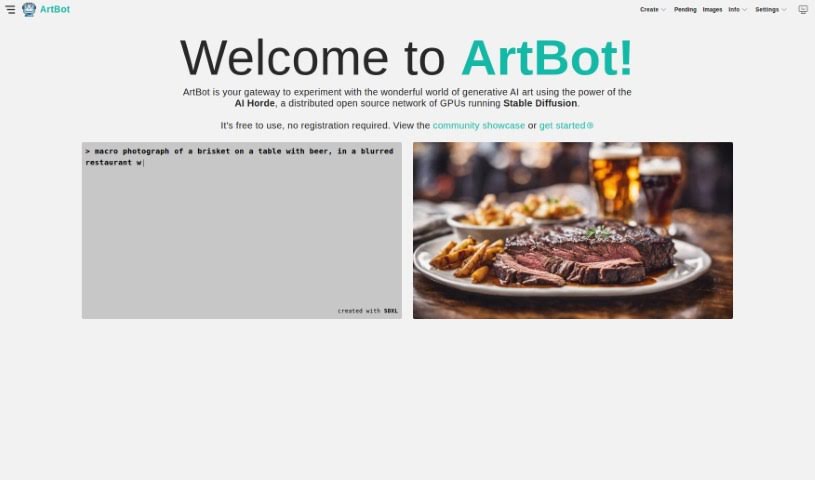
Screenshot of Artbot

Artbot

Discover Artbot in 2025! Learn what it is, how to use its features effectively, and see how it stacks up against other AI image generators.

Screenshot

What is Artbot?

ArtBot is a really neat platform that lets you create AI-generated images. It uses Stable Diffusion, running on the AI Horde’s distributed network of GPUs. What’s great is that you don’t need to register to use it, making it totally free and accessible for everyone who wants to dive into generative art. You’ve got a bunch of cool tools at your fingertips, like ControlNet, Draw, Image-to-Image transformation, Inpainting, and Live Paint. These are all designed to help you be more creative and express yourself artistically. The interface is super easy to use, too. You can manage your images, rate others’ work, and check out a gallery filled with amazing art made by the community. Plus, they regularly add new models and make improvements, and if you ever need help, there’s a FAQ, or you can reach out directly on Discord or Mastodon. ArtBot really aims to build a community where people can explore, create, and share generative art, all within the open-source world.

Who created Artbot?

Dave Schumaker is the person behind ArtBot. He started it as a side project to play around with different client-side technologies. Essentially, it’s an unofficial front-end web client for the Stable Horde distributed cluster. This means you can use the AI Horde’s GPUs, which are running Stable Diffusion, to create generative AI art. If you want to connect with Dave, you can find him on Twitter at @davely, on Mastodon at [email protected], or on Discord as rockbandit#4910. He’s always updating the service with new models and features, and he really emphasizes community involvement and open-source collaboration.

What is Artbot used for?

  • No Registration Required: You can jump right in without signing up.
  • Create New Images: Use tools like ControlNet and Draw to make totally unique AI-generated images.
  • Image-to-Image Transformation: Give existing images a new life by transforming them into something else with the Image-to-Image feature.
  • Inpainting & Live Paint: You can refine your creations with Inpainting, or get creative in real-time using Live Paint.
  • Community Showcase: Browse a gallery of art made by other users and share your own creations, too!
  • Image-to-image transformation: Transform existing images into new artworks.
  • Create New Images: Craft unique AI-generated images using various tools.
  • Inpainting & Live Paint: Enhance and refine your art in real-time.
  • Community Showcase: Explore and share artworks created by the user community.

Who is Artbot for?

  • Artists
  • Designers
  • Illustrators
  • Photographers
  • Content creators
  • Creative professionals

How to use Artbot?

Want to create some AI-generated images with ArtBot? It’s pretty straightforward. Here’s how you can get started:

  1. Head over to ArtBot: Just visit the ArtBot website. It’s your go-to spot for generative AI art creation, using Stable Diffusion on the AI Horde’s GPU network. And remember, no registration is needed!
  2. Play with the Features: You can use tools like ControlNet and Draw to craft unique images. Plus, you can transform your existing pictures using the Image-to-Image feature.
  3. Refine Your Art: Want to make your creations even better? Use features like Inpainting to enhance them, or try Live Paint for real-time creative sessions.
  4. Join the Community: Check out the community showcase to see what others are making and share your own masterpieces. It’s a great way to connect and get inspired.
  5. No Registration Needed: Seriously, you get full access to everything without signing up. It’s super easy to just jump in and start creating.
  6. Stay Up-to-Date: ArtBot is always getting better with regular updates, new models, and enhancements to boost your creative experience.
  7. Get Support: If you have questions, the FAQ section is a good place to start. You can also reach out directly on Discord, Mastodon, or Twitter if you need help or want to share your thoughts.

By following these simple steps, you can dive into the exciting world of generative AI art with ArtBot’s user-friendly tools and diverse features.

Related AI Tools

Discover more tools in similar categories that might interest you

123RF AI Image Generator

Creative Image Generation
Learn More

Stay Updated with AI Tools

Get weekly updates on the latest AI tools, trends, and insights delivered to your inbox

Join 25,000+ AI enthusiasts. No spam, unsubscribe anytime.