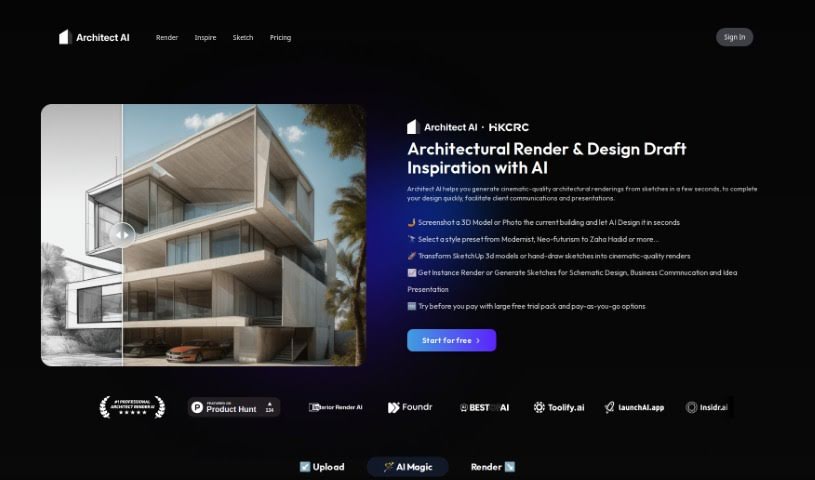
Screenshot of Architect AI

Architect AI

Discover what Architect AI is and how to use it effectively in 2025. We'll explore its features and see how it stacks up against other Architect Tools.

Screenshot

What is Architect AI?

Architect AI is a really neat tool built specifically for architects. It uses GPT (Generative Pre-trained Transformer) technology to quickly create high-quality architectural renderings, starting from just your initial sketches. This means you can speed up your design process quite a bit, letting you finalize designs much more efficiently.

It’s not just about making renderings, though. Architect AI also helps you communicate better with clients and makes your presentations shine. You can use features like “Sketch to Render” and “Photo to Render” to turn your design sketches or even photos into inspiring architectural visuals. Plus, you get to play around with all sorts of design elements – think architectural styles, landscapes, exteriors, materials, and so much more. It offers a ton of ways to customize your creations.

Basically, if you’re an architect looking to speed up how you create renderings and connect better with clients on your projects, Architect AI is a seriously valuable asset.

Who created Architect AI?

Architect AI was developed by the Hong Kong Center for Construction Robotics and first came out on September 8, 2023. Like we mentioned, it uses GPT (Generative Pre-trained Transformer) technology to quickly whip up high-quality architectural renderings from your conceptual sketches. This really helps streamline the whole design process for architects.

You can upload your sketches or photos, tweak settings, pick from different architectural styles, environments, and materials to generate customized renderings fast and easily. Architect AI’s goal is to boost design efficiency and make client communication smoother, all thanks to its flexible design options.

What is Architect AI used for?

  • You can generate cinematic-quality architectural renderings from sketches in just a few seconds.
  • It helps you complete your designs much faster.
  • It makes client communications and presentations much easier.
  • You can transform SketchUp 3D models or even your hand-drawn sketches into cinematic-quality renders.
  • Need a quick render or want to generate sketches for schematic design, business communication, or presenting ideas? This tool does that.
  • Just upload your sketch design drafts, photos, or screenshots from modeling software, and it generates realistic renders perfect for presentations.
  • Showcase your high-quality renderings in your portfolio.
  • You can easily edit various conditions like the environment, weather, and style.
  • Feel free to experiment with different exterior materials.
  • It streamlines the entire design process, boosting efficiency and ensuring effective client communication.
  • It generates high-quality architectural renderings from conceptual sketches.
  • Get instant renders or create sketches for schematic design, business communication, and idea presentation.
  • Upload sketch design drafts, photos, or screenshots, adjust the settings, and generate realistic renders.
  • You have the freedom to edit conditions like environment, weather, and style.
  • Experiment with different exterior materials, such as brick, glass curtain walls, and metal panels.
  • Choose from a wide variety of architectural styles, including Modernist, Neo-futurism, Zaha Hadid, Renaissance, Brutalism, and Postmodernism.
  • Select different landscapes and environments, like forests, urban areas, mountains, or rural settings.
  • It generates high-quality architectural renderings from conceptual sketches.
  • It really helps with client communications and presentations.
  • Transform SketchUp 3D models or hand-drawn sketches into cinematic-quality renders.
  • It offers style presets ranging from Modernist and Neo-futurism to Zaha Hadid.
  • You can experiment with different exterior materials and environments.
  • It gives you the flexibility to edit environmental conditions, weather, and style.
  • You can upload photos or sketches and then generate realistic renders for your presentations.
  • It’s super helpful for schematic design, business communication, and presenting ideas.
  • It streamlines the design process for architects.
  • The aim is to improve efficiency and ensure effective client communication.
  • Generate cinematic-quality architectural renderings from sketches in seconds.
  • Complete designs quickly.
  • Generate sketches for schematic design, business communication, and idea presentation.
  • Upload sketch design drafts, photos, or screenshots from modeling software to generate realistic renders.
  • Experiment with different architectural styles and landscapes.
  • Streamline the design process for architects.
  • Upload design sketches and generate design inspirations.
  • Upload a photograph and re-render a new design based on a natural language description and your design preferences.
  • Edit conditions like environment, weather, and style.
  • Select from a variety of architectural styles and landscapes.
  • Experiment with different exterior materials, such as brick, glass curtain walls, and metal panels.
  • Streamline the design process for better efficiency and effective client communication.
  • Generate cinematic-quality architectural renderings from sketches.
  • Upload sketch design drafts, photos, or snapshots for realistic renders.
  • Edit conditions freely, including environment, weather, style, and more.
  • Generate controllable architectural renderings using natural language.
  • Experiment with different exterior materials and architectural styles.
  • Enhance your portfolio displays with high-quality renderings.
  • Streamline the design process for efficiency.
  • Achieve effective client communication through visual presentations.
  • Transform SketchUp 3D models or hand-drawn sketches into renders.
  • Generate sketches for Schematic Design.
  • Upload sketch design drafts and photos.
  • Adjust parameters and generate realistic renders.
  • Display high-quality renderings in your portfolio.
  • Edit various conditions like environment and style.

Who is Architect AI for?

  • Architects
  • Professional Architects
  • Designers
  • Architectural Professionals

How to use Architect AI?

Using Architect AI is pretty straightforward. Just follow these steps:

  1. Upload Your Design: First, upload your design sketches, photos, or screenshots from your modeling software to the tool.
  2. Choose Your Settings: Next, adjust the parameters to your liking. You can pick from different style presets, like Modernist, Neo-futurism, Zaha Hadid, and many others.
  3. Generate Your Renderings: Use the tool to turn your SketchUp 3D models or hand-drawn sketches into cinematic-quality renders – it only takes a few seconds!
  4. Select Render Type: Decide if you want an Instant Render or if you’d rather Generate Sketches for things like Schematic Design, Business Communication, or presenting your ideas.
  5. Experiment with Styles: Have fun trying out different architectural styles and exterior design options that the tool offers. You can choose from various landscapes, environments, and exterior materials like brick, glass curtain walls, and metal panels.
  6. Edit Conditions: Tweak settings for the environment, weather, and style to match your design vision. You can even use natural language to describe what you want and generate controllable architectural renderings.
  7. Review and Save: Take a look at the renderings you’ve generated and save the ones that best capture your design vision. These are great for your portfolio or for showing clients.
  8. Trial and Payment Options: You can try it out randomly for free without needing a subscription. Architect AI also offers pay-as-you-go options, so you have flexibility and no automatic billing to worry about.

Architect AI really simplifies the architectural design process by giving you quick, high-quality renderings from your sketches and photos. Thanks to its AI technology and all the different design options, architects can finish designs efficiently, communicate clearly with clients, and make their presentations look much better. It’s a fantastic tool for architects who want to streamline their workflow and create stunning architectural renderings without a hassle.

Related AI Tools

Discover more tools in similar categories that might interest you

Stay Updated with AI Tools

Get weekly updates on the latest AI tools, trends, and insights delivered to your inbox

Join 25,000+ AI enthusiasts. No spam, unsubscribe anytime.