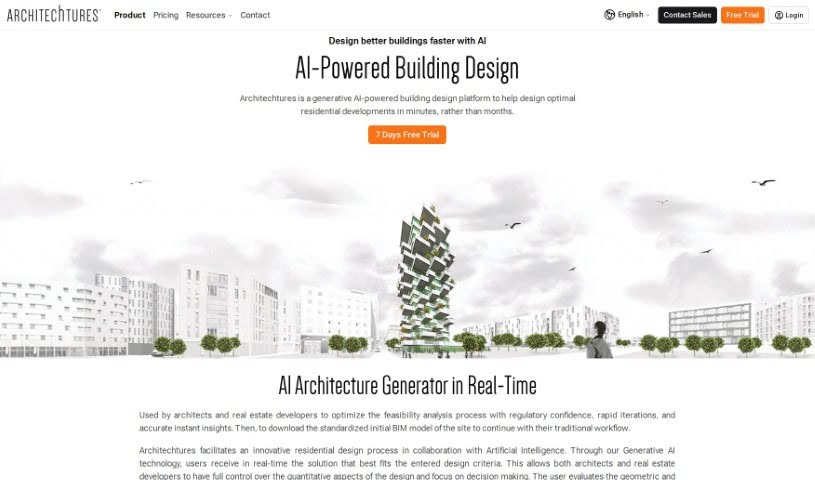
Screenshot of Architechtures

Architechtures

Discover Architechtures, an AI-powered platform for residential building design. Learn how to use its features effectively in 2025 and see how it stacks up against other architectural tools.

Screenshot

What is Architechtures?

ARCHITEChTURES is an AI-powered platform designed to really boost how we design homes. It uses Generative AI to help architects and real estate developers create optimized residential projects much faster – we’re talking about cutting design time from months down to mere minutes! It’s a smart blend of human know-how and AI’s processing power, giving you real-time design experiences and instant results, both geometrically and analytically. Plus, it fits right into your existing BIM workflows. Looking ahead, they’re planning to add even more cool features like daylight and energy analysis, tools for working together on designs, and detailed cost estimates. The goal? To truly transform how we approach residential architectural design.

Who created Architechtures?

Architechtures was developed by Smartscapes Studio. They’re a tech company that really dives deep into ‘Deep Tech,’ focusing on computational design and AI. The founder, Juan Bordallo, leads a team of folks who are experts in architecture, computer design, and using AI for sustainable building design. The company has gotten support from various organizations and has even won awards for its innovative work, like the Yecla Bioclimatic Building in Murcia, Spain. Architechtures itself is recognized for its innovative AI design tools that make building design more efficient and sustainable, earning praise in the real estate sector.

What is Architechtures used for?

  • Streamlining feasibility analysis: This process gets a boost with regulatory confidence, super-fast iterations, and accurate, instant insights. It helps architects and real estate developers get a clear picture right away.
  • Collaborative residential design: It uses Generative AI technology to make designing homes a team effort.
  • Real-time solution generation: The platform creates building solutions instantly based on the design criteria you input.
  • Controlling design aspects: You get control over the quantitative parts of your design, which really helps with making decisions.
  • Evaluating results: You can easily check geometric and analytical results and then tweak your design as needed.
  • Introducing design criteria: It helps you bring in specific design requirements, like minimum and maximum net areas, room dimensions, and other specifications to make sure your project complies with regulations.
  • Integrated manual modeling: You can do manual project modeling, but it works hand-in-hand with AI.
  • Design optimization: The system helps optimize designs to better meet what users need.
  • Real-time BIM models: It generates BIM models that you can navigate online.
  • Instant data monitoring: You get immediate insights into floor areas and other project data.
  • Cost estimation: It provides real-time cost estimates and quantities takeoffs, so you always know the economic impact of your design choices.
  • Improving collaboration: They’re planning to add tools to make teamwork even better.
  • Environmental responsiveness: The platform is designed to be responsive to environmental factors and help with building performance simulations.

Who is Architechtures for?

  • Architects
  • Real Estate Developers

How to use Architechtures?

To get the most out of ARCHITEChTURES for your residential design projects, here’s a straightforward guide:

  1. Start with Design Criteria and Modeling:
    • First, input all the specific design criteria for your project.
    • Then, you can model your solution right there online, easily working in both 2D and 3D.
  2. Let the AI Develop Your Design:
    • Use the cloud-based AI system. It’s designed to generate the geometry that best matches the parameters you’ve entered, giving you optimized results with each user iteration.
  3. Get Your BIM Solution and Project Data:
    • You’ll receive the BIM solution and key project metrics in real time.
    • You can then download this data in formats like XLSX, DXF, and IFC, ready for whatever you need to do next.
  4. Define Your Environment:
    • Here, you’ll set specific design criteria, such as net areas and dimensions, to ensure your project meets all requirements.
  5. Customize with Home Edition:
    • This edition lets you do manual project modeling, but it’s integrated with AI, so you can create truly customized design solutions.
  6. Refine with Building Edition:
    • Optimize your design to perfectly meet user needs by iteratively adjusting the parameters.
  7. Explore Your BIM Model:
    • You can check out the real-time BIM model online. It’s fully navigable, giving you access to all the data.
  8. Monitor Floor by Floor:
    • Keep track of instant floor areas and other project data as you go.
  9. Track Real-time Costs:
    • Stay up-to-date with quantities takeoffs that are always updated, so you have real-time awareness of costs.
  10. Look Out for What’s Next:
    • Keep an eye out for upcoming features! They’re planning to add more advanced functionalities, like tools for collaborative design and better environmental responsiveness.

By following these steps, you can easily use ARCHITEChTURES’ AI technology to make your residential design process more efficient, optimized, and collaborative.

Related AI Tools

Discover more tools in similar categories that might interest you

Stay Updated with AI Tools

Get weekly updates on the latest AI tools, trends, and insights delivered to your inbox

Join 25,000+ AI enthusiasts. No spam, unsubscribe anytime.