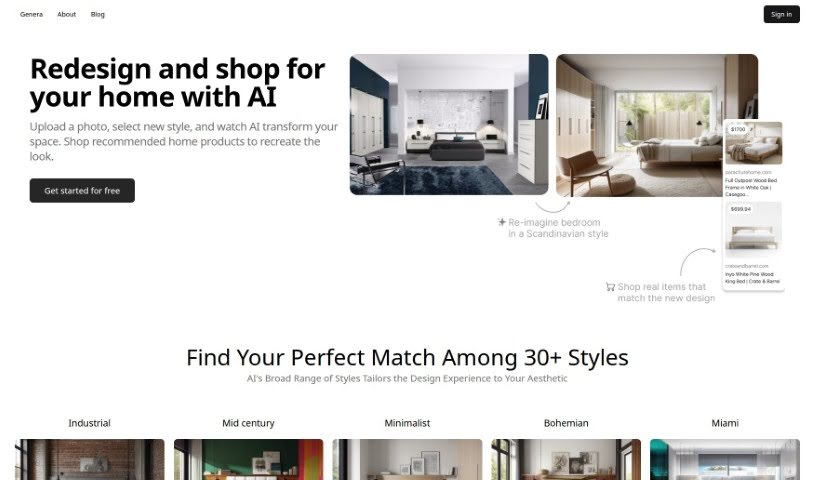
Screenshot of Arch-E

Arch-E

Discover Arch-E in 2025! Learn what this AI tool is, how to use its features effectively, and how it stacks up against other image generators.

Screenshot

What is Arch-E?

Arch-E is a smart machine learning model built to create images of buildings from text descriptions and to turn architectural sketches into photorealistic visuals. It learned how to do this by studying thousands of architectural images. If you want to redecorate a space, you can upload a photo of it and pick a new style. Arch-E’s AI designer will then give you a reimagined version of the room, all in under 30 seconds!

This tool is especially helpful for folks in architecture, interior design, and industrial design. It can really boost your creative process and help you visualize your ideas better. Arch-E can even mimic different architectural styles and generate interior design images based on what you describe. Plus, it helps you visualize and redesign your living spaces by using AI to understand what you like.

Who created Arch-E?

Arch-E comes from Genera, a company that focuses on creating AI applications for design. They launched Arch-E on June 1, 2023. Genera believes that using specialized models, developed by professionals from various creative fields, is the best way to handle different tasks effectively. Arch-E itself is a machine learning model, trained on a huge dataset of architectural images. This training allows it to generate building images from text and render architectural sketches with photorealistic detail.

What is Arch-E used for?

  • It helps visualize architectural designs.
  • It improves creative workflows for interior and architectural designers.
  • It can simulate various architectural styles.
  • It generates images of buildings from text descriptions.
  • It renders architectural sketches with photorealistic detail.
  • It helps visualize and redesign living spaces.
  • It supports sketch renders and shape explorations.
  • It creates photorealistic architectural images.
  • It aids industrial design by visualizing concepts.
  • It enhances creative processes across architecture, interior design, and industrial design.

Who is Arch-E for?

  • Architects
  • Interior designers
  • Industrial designers

How to use Arch-E?

To get the most out of Arch-E, just follow these simple steps:

  1. First, upload a photo of your space to the Arch-E platform.
  2. Next, choose a new style from over 30 options, like Industrial, Mid Century, or Minimalist.
  3. Then, let the computer vision and machine learning technology analyze your room and apply the style you picked.
  4. You’ll see the redesigned room from the AI in less than 30 seconds. Feel free to make any adjustments you like.
  5. You’ll also get helpful suggestions for furniture and decor that fit your new design style.
  6. Explore the visualizations the AI creates based on your preferences, and try out different architectural designs and interiors.
  7. Use Arch-E for sketch renders and shape explorations. Remember, it’s particularly useful for professionals in architecture, interior design, and industrial design.
  8. For detailed spatial representations and photorealistic architectural images, just describe what you’re looking for to Arch-E, and it will provide accurate visual outputs.

By following these steps, you can really use Arch-E to boost your creativity in architectural and interior design.

Related AI Tools

Discover more tools in similar categories that might interest you

123RF AI Image Generator

Creative Image Generation
Learn More

Stay Updated with AI Tools

Get weekly updates on the latest AI tools, trends, and insights delivered to your inbox

Join 25,000+ AI enthusiasts. No spam, unsubscribe anytime.