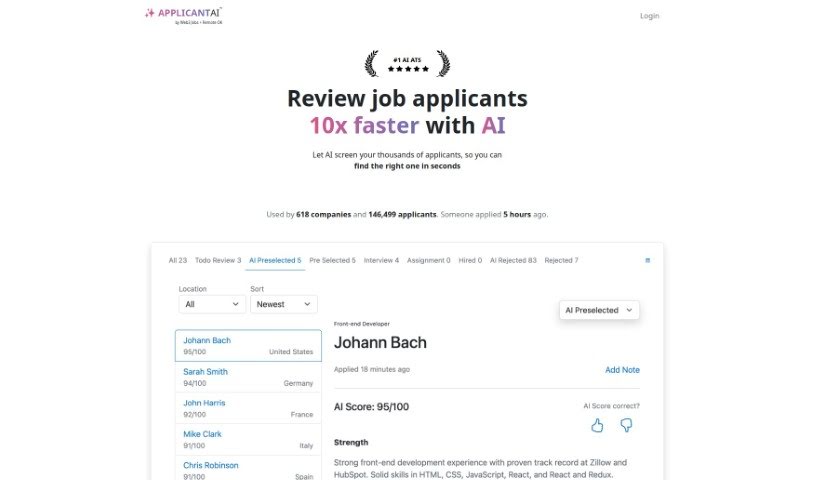
Screenshot of Applicant Ai

Applicant Ai

Discover what Applicant AI is and how to use it effectively in 2025. We'll explore its features, compare it to other recruitment tools, and show you how it can speed up your hiring process.

Screenshot

What is Applicant AI?

Applicant AI is an Artificial Intelligence Applicant Tracking System. Essentially, it’s designed to automate the initial screening of job applicants. It does this by comparing resumes against the specific requirements of job descriptions. This system can help recruiters evaluate job candidates up to ten times faster. How? By using AI to efficiently sift through thousands of applications. Plus, Applicant AI is known for being user-friendly. Many companies trust it, and users tend to be very satisfied, making it a really helpful tool for managing everyone who applies for your jobs.

Who created Applicant Ai?

The documents provided don’t actually mention who founded Applicant AI. It’s likely a smaller company, given that information about the founder isn’t easy to find. They seem to keep a pretty low profile, focusing more on their product and services rather than publicizing the people behind it. If you’re looking for more in-depth details about the founder, you’ll probably need to check other sources outside of what’s available here.

What is Applicant Ai used for?

Applicant AI helps you manage your entire hiring process more smoothly. Here’s a breakdown of what you can do with it:

  • Build Your Brand: Create a company career page that reflects your brand’s look and feel.
  • Post Jobs: Easily add new job openings to your system.
  • Clarify Roles: Include specific questions with job postings to get clearer information from candidates.
  • Application Forms: Design custom application forms for candidates to fill out.
  • Review Applicants: See and manage all your applicants in one place.
  • Automate Rejections: Send automatic rejection emails to candidates who aren’t a good fit. You can even customize these from a template.
  • Schedule Interviews: Send out interview invitations to promising candidates.
  • Embed Jobs: Put all your job listings, or just individual ones, directly onto your website’s career page.
  • Pipeline Management: Move applicants through different stages of your hiring process. This includes stages like reject, pre-select, assessment, and interview.
  • Efficient Pre-Screening: The system automatically analyzes resumes, comparing them against job descriptions to help you screen candidates much more efficiently.
  • Unlimited Jobs: You can add as many job listings as you need.

Who is Applicant Ai for?

Applicant AI is a great tool for anyone involved in hiring. This includes:

  • Recruiters
  • Hiring managers
  • HR Professionals
  • Companies of all sizes
  • Employers
  • Anyone looking to streamline their recruitment process

How to use Applicant Ai?

To get the most out of Applicant AI, just follow these straightforward steps:

  1. Sign Up: Head over to the Applicant AI website and click the ‘Sign Up’ button to get started.
  2. Register: Fill out the registration form with the necessary details to create your account.
  3. Explore the Interface: Take a moment to get comfortable with the system’s layout – it’s designed to be really user-friendly.
  4. Use Automatic Pre-Screening: Let the system do the heavy lifting! Its automatic pre-screening feature analyzes resumes against your job descriptions, saving you a ton of time.
  5. Boost Your Efficiency: You’ll notice a big difference in how quickly you can review applicants, thanks to the AI assistance.
  6. Stay Updated: Get real-time notifications whenever a new applicant applies, so you’re always in the loop.
  7. Create Your Career Page: Build a custom career page that matches your company’s branding.
  8. Add Job Listings: Post as many jobs as you need, and add specific questions to each one to make the application process even smoother.
  9. Manage Your Candidates: Keep track of everyone who applies, move them through the different stages of your hiring pipeline, and send out automated rejection emails when needed.
  10. Invite for Interviews: It’s easy to invite the candidates you’re most interested in for an interview.
  11. Stay Compliant: Remember, while the AI helps screen, it’s important to prioritize human decision-making for final selection to ensure you’re meeting all regulations.
  12. Get Support: The developers offer responsive support, and they’re always looking for feedback to keep improving the platform.

By following these steps, you can really make the most of Applicant AI. It’s a powerful way to make your recruitment process smoother, save valuable time, and ultimately find better candidates for your open roles.

Related AI Tools

Discover more tools in similar categories that might interest you

Adaface AI Resume Parser

Human Resource Recruitment
Learn More

Stay Updated with AI Tools

Get weekly updates on the latest AI tools, trends, and insights delivered to your inbox

Join 25,000+ AI enthusiasts. No spam, unsubscribe anytime.