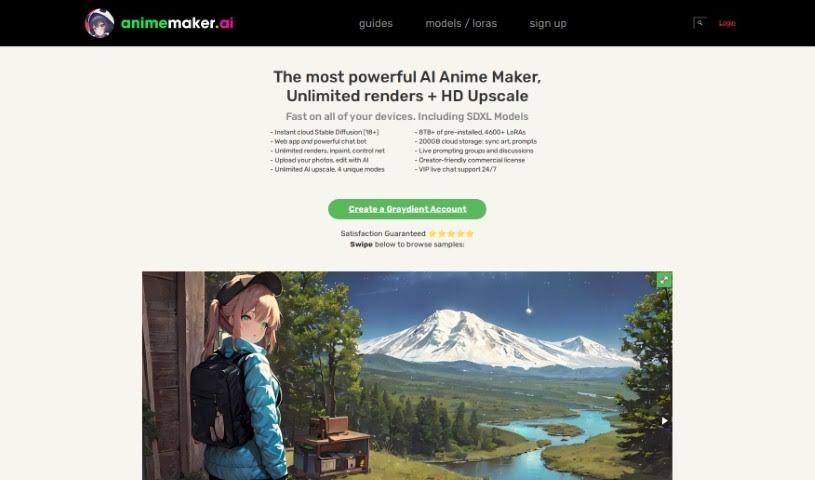
Screenshot of AnimeMaker AI

AnimeMaker AI

Discover AnimeMaker AI in 2025! Learn what it is, how to use its powerful features for anime image creation, editing, and upscaling, and how it stacks up against other AI image generators.

Screenshot

What is AnimeMaker AI?

AnimeMaker AI is a really neat cloud-based tool that uses artificial intelligence specifically for making, generating, editing, and even improving the resolution of anime-style images. It is your go-to digital studio for all things anime art. It comes packed with features like high-resolution rendering, advanced editing tools, and something called ‘control net’ functionality. Plus, you get a huge library of pre-installed styles and models, so you can really dive in and customize your creations. The best part? You can use it from any device without worrying about needing a powerful computer or a ton of storage space. They also offer live chat support and let you switch between devices smoothly, which is super handy.

Who created AnimeMaker AI?

AnimeMakerAI was actually built by the same folks behind Graydient.ai, which is a well-known service for hosting Stable Diffusion XL. This experienced team, who also have a history of building popular sites like Destructoid, Upcomer, and Classic dot com, launched the platform on March 11, 2023. They’ve packed it with advanced features, just like you’d expect from their other projects. This includes high-resolution rendering, inpainting (which lets you edit specific parts of an image), control net, and that smooth device switching we mentioned. They really focus on making it user-friendly, even offering 24/7 live chat support and a commercial license that’s friendly to creators.

What is AnimeMaker AI used for?

Basically, you can use AnimeMaker AI for a whole bunch of things related to anime art:

  • Creating, generating, editing, and upscaling anime-style images.
  • Rendering images in high resolution.
  • Editing photos using AI power.
  • Upscaling your images with AI, as much as you want.
  • Using a wide variety of pre-installed styles and models to make your art unique.
  • Storing your art and prompts in the cloud so they’re always synced up.
  • Getting help anytime with 24/7 live chat support.
  • Using your creations commercially, thanks to a creator-friendly license.
  • Switching between your computer, tablet, or phone without any hassle.
  • Bringing your personalized and creative projects to life with AI.
  • Accessing advanced tools like inpaint and control net for detailed editing.
  • Rendering images at high resolutions.
  • Upscaling images an unlimited number of times, with three different modes to choose from.
  • Exploring over a terabyte of pre-installed styles and resources to really customize your work.
  • Keeping your art and prompts safe and sound with cloud-based storage.
  • Switching between devices without any annoying setup delays.
  • Using your creations commercially with a license that’s designed for creators.
  • Finding dedicated guides to help you get started easily.
  • Processing images quickly, using all sorts of community-made styles.

Who is AnimeMaker AI for?

This tool is perfect for a variety of creative professionals and enthusiasts, including:

  • Graphic designers
  • Animators
  • Artists
  • Illustrators
  • Content creators
  • Designers
  • Animation Artists

How to use AnimeMaker AI?

Getting started with AnimeMaker AI is pretty straightforward. Here’s a simple breakdown:

  1. First, just hop onto the free, cloud-based platform, AnimeMaker AI.
  2. Take a look around at the main features. You can upload photos and use the AI editing options to tweak them just how you like.
  3. Make sure to try out the high-resolution rendering and advanced functions like inpaint and control net for more detailed work.
  4. Don’t forget to use the unlimited AI upscale feature – it has three unique modes that can really boost your image quality.
  5. You’ve got over a terabyte of pre-installed styles and resources available, so have fun customizing!
  6. Use the cloud storage to keep your art and prompts safe and organized.
  7. If you ever get stuck, remember there’s 24/7 live chat support and dedicated guides ready to help you out.
  8. You can switch between devices seamlessly, so your creative flow never has to stop.
  9. Feel free to use the creator-friendly license for commercial projects across different platforms.
  10. To make sure you’re happy, they offer a risk-free 7-day refund policy, giving you plenty of time to explore and create some amazing anime-style images.

Related AI Tools

Discover more tools in similar categories that might interest you

123RF AI Image Generator

Creative Image Generation
Learn More

Stay Updated with AI Tools

Get weekly updates on the latest AI tools, trends, and insights delivered to your inbox

Join 25,000+ AI enthusiasts. No spam, unsubscribe anytime.