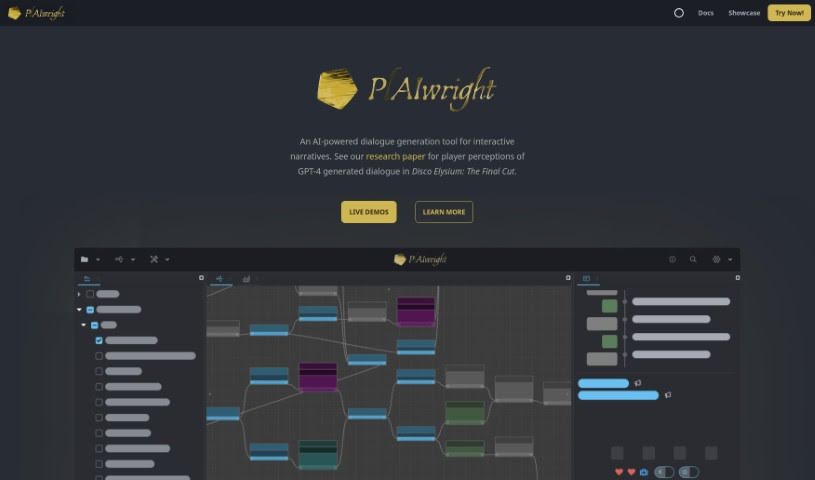
Screenshot of Aiwright

Aiwright

Discover Aiwright in 2025 – your AI-powered dialogue generator for interactive stories. We'll walk you through its features, how to use it, and how it stacks up against other story generators.

Screenshot

What is Aiwright?

Aiwright is an AI tool specifically built for creating dialogue in interactive stories. It is a smart assistant for writers working on games or other narrative experiences. It can analyze dialogue content, group similar conversations together, and even generate new dialogue using a blend of code and natural language. Plus, it helps you test your dialogues, run experiments, and fine-tune them based on what players prefer. Essentially, Aiwright is all about making dialogue in interactive narratives more engaging and immersive.

Who created Aiwright?

The person behind Aiwright first explored AI during their undergraduate studies. They later moved into the game industry before deciding to pursue a PhD to really push the boundaries of interactive storytelling. Aiwright itself was launched on November 30, 2023, with a clear goal: to make creating and analyzing dialogue for interactive narratives much better.

What is Aiwright used for?

Aiwright is a versatile tool for anyone working with dialogue in interactive narratives. Here’s a breakdown of what it helps you do:

  • Generate Dialogue: Create new dialogue specifically for interactive stories.
  • Analyze Dialogue Graphs: Dive deep into large, complex dialogue structures.
  • Cluster Dialogues: Group conversations based on different characteristics.
  • Grounded Generation: Produce dialogue using a mix of code and natural language for more control.
  • Playtest Dialogues: Test your dialogues with users to get feedback and understand preferences.
  • Compare Dialogue Options: Use experimental analysis to see which dialogue choices work best.
  • Refine Dialogue: Improve the quality and effectiveness of your generated conversations.
  • Understand Player Preferences: Get a clearer picture of what players like in dialogue choices.
  • Enhance Storytelling: Make interactive stories more engaging and immersive.
  • Improve Creation & Analysis: Streamline the process of making and understanding dialogue content.
  • Compare Models: Analyze and contrast different AI language models for dialogue generation.

Who is Aiwright for?

If you’re involved in creating interactive stories, Aiwright is likely a great fit for you. It’s particularly useful for:

  • Game developers
  • Interactive Narrative Writers
  • AI enthusiasts
  • Interactive Storytellers
  • Dialogue Writers

How to use Aiwright?

Here’s a simple guide to get you started with Aiwright and make the most of its features:

  1. Sign Up: First things first, create an account on the Aiwright platform. Just fill in your details and complete the registration.
  2. Explore Features: Once you’re in, take a little time to look around. Get familiar with all the different features and how everything is laid out.
  3. Create a Project: Ready to start? Click the “Create Project” button. Give your project a name and a brief description so you can easily tell it apart from others.
  4. Import Your Data: Upload or enter the information you want to analyze. Aiwright is flexible and supports various data formats, making it easy to work with whatever you have.
  5. Use Analysis Tools: Dive into the analysis tools Aiwright offers to really understand your data. You’ll find everything from basic stats to more advanced processing capabilities.
  6. Visualize Your Data: Make your findings clear by creating visual representations. Charts, graphs, and interactive dashboards are great for presenting your insights.
  7. Collaborate with Your Team: Share your projects on Aiwright to work with others. You can invite colleagues to view or even edit the project with you in real-time.
  8. Export Your Results: When you’re done analyzing, export your results in the format you need. Aiwright lets you save reports, tables, or visualizations for later use or sharing.
  9. Keep Learning: Make sure to check out the tutorials, guides, and other online resources Aiwright provides. They’re super helpful for improving your skills and finding advanced features.
  10. Share Feedback & Get Support: Help Aiwright get even better by sharing your feedback. If you have any questions or run into issues, don’t hesitate to reach out to their support team.

By following these steps, you’ll be well on your way to using Aiwright effectively for your data analysis and uncovering valuable insights.

Related AI Tools

Discover more tools in similar categories that might interest you

123RF AI Image Generator

Creative Image Generation
Learn More

Stay Updated with AI Tools

Get weekly updates on the latest AI tools, trends, and insights delivered to your inbox

Join 25,000+ AI enthusiasts. No spam, unsubscribe anytime.