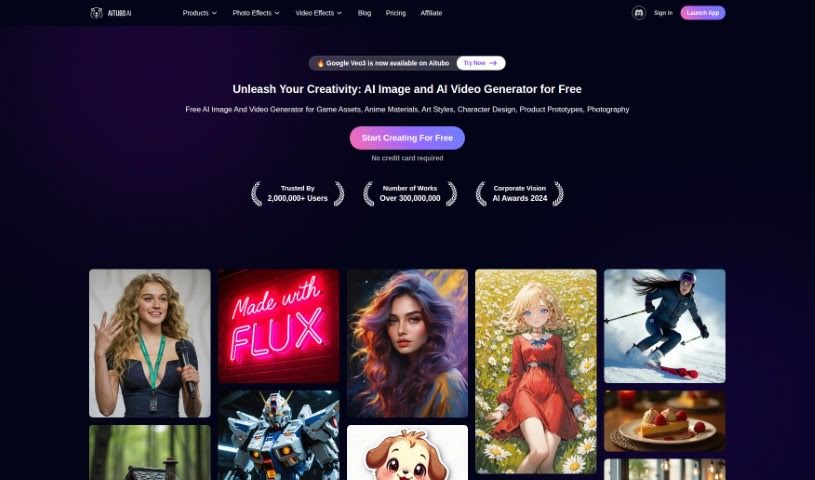
Screenshot of Aitubo

Aitubo

Discover what Aitubo is and how to use it effectively in 2025. We'll explore its features and see how it stacks up against other Image Generators.

Screenshot

What is Aitubo?

Aitubo is an AI art generator tool designed to help you create high-quality images from text and photo inputs, perfect for game design and other creative projects. It is a way to turn your sketches into polished masterpieces using AI. It’s particularly great for efficiently creating game assets like characters and cartoons. Aitubo really shines with its key features: an AI generator that speeds up the creation of materials for building game worlds, an AI editor that gives you control over image editing, and a model library packed with various professional models ready for generating production-quality art assets. This tool is a game-changer for game design because it focuses on producing top-notch game assets, offers professional models for things like game characters, and brings truly transformative capabilities to game design. Plus, Aitubo can whip up all sorts of images – think game material pictures, architectural visualizations, character action shots, and even images with a 3D depth-of-field effect. Since it’s web-based, you can easily access it online without needing to install any special software.

Who created Aitubo?

Aitubo comes from an AI image and video generator company that’s really focused on making high-quality images for game design and creative work. They launched the tool on March 23, 2023. It’s built to help users quickly turn their sketches into amazing art using AI technology, especially when it comes to creating game assets like characters and cartoons. The platform itself is web-based, making it super accessible, and it offers professional models for generating assets. You can also generate images from text and photos, and it includes an AI editor for tweaking your images.

What is Aitubo used for?

  • Creating high-quality images
  • Making game assets efficiently
  • Using professional models for assets
  • Accessing a web-based application
  • Generating pictures from sketches
  • Generating pictures from photos
  • Bringing creative ideas to life
  • Quickly building game worlds
  • Iterating on a cohesive style
  • Producing art assets ready for production
  • Exploring different model possibilities
  • Enabling transformative game design
  • Generating architectural effect pictures
  • Creating character dynamic pictures
  • Crafting an endless universe of visuals
  • Creating things efficiently and accurately
  • Generating various art assets

Who is Aitubo for?

  • Game Designers
  • Artists
  • Creators

How to use Aitubo?

Here’s a simple guide to using Aitubo:

  1. Get Started: First, head over to the Aitubo website and log in to the web application.

  2. Generate Your Image:

    • Create a Base Image: Begin by generating your initial image.
    • Expand Your Image: Decide which direction you want to expand in and quickly generate new images based on your base.
  3. Edit and Get Creative:

    • AI Image Editor: Use the AI editor for controlled image editing. It’s great for creating scene art, character art, and game assets.
    • Face Swap: Try out face swaps to bring your creative ideas to life and explore unlimited creative possibilities.
  4. Explore the Model Library:

    • Dive into the model library to find and use various professional models for generating your art assets.
  5. Utilize AI Tools:

    • The AI Generator is perfect for efficiently creating materials needed to build game worlds.
    • The AI Editor offers more precise control when editing your images.
  6. Generate Art Assets:

    • You can generate a wide range of images, like game characters, cartoons, architectural effect pictures, and more, starting from either sketches or photos.
  7. Add Final Touches:

    • Effortlessly enhance any image by upscaling it or removing its background.
  8. Key Benefits:

    • Aitubo offers high-quality image generation, makes game asset creation efficient, and provides transformative game design capabilities.
  9. Potential Limitations:

    • You might notice some style consistency issues, editing capabilities could be limited, and the interface might feel a bit complex at first.
  10. Common Use Cases:

    • It’s ideal for game designers, artists, and creators who need to quickly generate production-ready art assets and boost their creativity.

By following these steps, you can really make the most of Aitubo’s AI art generator for your game design and creative projects.

Related AI Tools

Discover more tools in similar categories that might interest you

123RF AI Image Generator

Creative Image Generation
Learn More

Stay Updated with AI Tools

Get weekly updates on the latest AI tools, trends, and insights delivered to your inbox

Join 25,000+ AI enthusiasts. No spam, unsubscribe anytime.