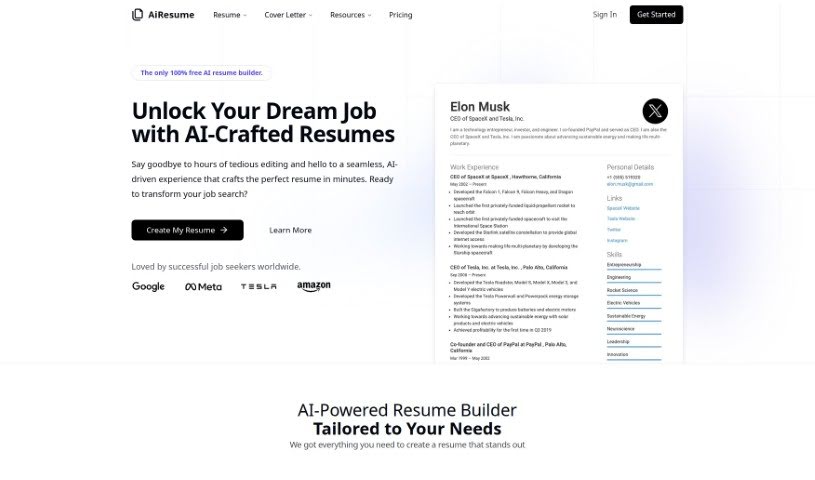
Screenshot of Airesume

Airesume

Discover Airesume, an AI-powered resume builder. Learn its features, how it compares to other resume builders, and how to use it to create professional, ATS-friendly resumes that boost your job prospects in 2025.

Screenshot

What is Airesume?

Airesume is a smart resume builder that uses AI to make creating professional resumes much simpler. It was developed by Amir, a solo entrepreneur who wanted to help people build impressive resumes without the usual hassle. It is your AI assistant for resume writing. You can get AI-generated content, use AI to help you write when you’re stuck, pick from lots of customizable templates, and make sure your resume is friendly to Applicant Tracking Systems (ATS). It also has a modern editor, lets you import your old resumes easily, and lets you download or share your new resume in just a click. You can even try out Airesume.com for free to see how helpful the AI tools are before you decide on a subscription. The main idea is to help you create a polished resume that really helps you get noticed in the job market and land interviews.

Who created Airesume?

Amir, a solo entrepreneur with 12 years of web development experience, is the creator behind Airesume. He launched the platform on October 4, 2023, with a clear mission: to make resume building easy using AI. His goal was to help people create impressive resumes without much effort. What makes Airesume stand out is its strong AI integration and focus on the user. It offers cool features like AI-generated content and templates you can really make your own. Ultimately, Amir wants to support people in their careers by giving them well-crafted resumes that fit their specific needs.

What is Airesume used for?

  • Crafting Resumes with AI: Generate your resume content using AI.
  • ATS Optimization: Build resumes that Applicant Tracking Systems (ATS) can easily read, improving your chances of getting an interview.
  • Next-Gen Editing: Use a modern editor to create a resume that truly stands out.
  • Easy Import: Bring in your existing resume from PDF files or your LinkedIn profile.
  • Quick Downloads: Get your resume in popular formats with just one click.
  • Simple Sharing: Share your resume with potential employers without any fuss.
  • Vast Template Library: Access over 1500 professionally designed resume examples and templates.
  • Personalized Branding: Customize templates to match your unique personal brand and style.
  • Instant Previews: See exactly how your resume looks as you build it, with real-time previews.
  • Expert Template Choices: Select from a wide variety of templates created by resume experts.
  • ATS Compliance: Make sure your resume is optimized for Applicant Tracking Systems.
  • Market Standout: Help yourself get noticed in a competitive job market.
  • Streamlined Process: Simplify the entire resume-building process.
  • Effortless Creation: Create professional resumes with ease.
  • AI-Powered Tools: Use AI-driven tools to help with your resume.
  • Job Search Boost: Enhance your job search with polished, effective resumes.
  • Tailored Content: Get resume content specifically tailored to you, powered by GPT-4.
  • Customizable Templates: Choose from a range of resume templates you can adapt.
  • Easy Sharing: Make it simple to share your resume with employers.
  • Interview Chances: Increase your likelihood of getting job interviews by using AI to craft your resume.
  • Dream Job Focus: Help users land their dream jobs with resumes created by AI.
  • Swift & Effective: Create professional resumes quickly and efficiently.
  • Streamlined Professionalism: Make the process of creating professional resumes much smoother.
  • Effortless Excellence: Create a stellar resume easily and efficiently.
  • Showcasing Skills: Generate a well-crafted resume that highlights your skills and qualifications.
  • Unlocking Dreams: Help users get their dream jobs with resumes tailored to them.
  • Employer Attention: Optimize your resume to catch the eye of potential employers.
  • Interview Probability: Increase the chances of securing job interviews.
  • Personalized AI Content: Get AI-crafted resumes made just for your unique needs.
  • Editing Time Saver: Save hours of tedious editing in the resume creation process.
  • Swift Professionalism: Create professional resumes quickly and effectively.
  • AI-Crafted Polish: Use artificial intelligence to craft polished resumes.
  • Tailored for Needs: Enhance your job search with resumes tailored to your specific needs.
  • Interview Boost: Improve your interview chances with ATS-friendly resumes.
  • Seamless Experience: Enjoy a smooth resume-building experience.
  • Recruiter Readability: Optimize resumes so recruiters can read them easily.
  • Market Standout: Help users stand out in the competitive job market.
  • AI Simplification: Simplify resume creation using AI technology.
  • Standout Resumes: Create standout resumes with the next-gen editor.
  • Template Customization: Offer customizable resume templates to highlight your skills and experiences.
  • ATS Optimization: Optimize resumes for Applicant Tracking Systems.
  • AI Content Creation: Create standout resumes with AI-generated content.
  • Editor Customization: Utilize the next-gen editor for resume customization.
  • Resume Import: Import resumes from PDF or LinkedIn profiles.
  • Format Variety: Access multiple resume formats, including PDF, DOCX, and TXT.
  • Easy Sharing: Easily share your resumes with potential employers.
  • Template Selection: Choose from a variety of expert-designed templates.
  • Real-Time Previews: Experience real-time previews while building your resume.
  • Example Collection: Explore a collection of professionally designed resume examples.
  • Free Starter Version: Get started with a free version for AI-driven resume building.

Who is Airesume for?

  • Web Developers
  • Developers
  • Software engineers
  • Data scientists
  • Digital marketers
  • Project managers
  • Graphic designers
  • Sales professionals
  • Finance professionals
  • Developers
  • Web Developers
  • Professionals

How to use Airesume?

Here’s a straightforward guide to using Airesume effectively:

  1. Get Started with an Account: First, sign up on AiResume.com. This gives you access to all the resume-building tools.
  2. Begin Building Your Resume:
    • Import Your Existing Resume: You can upload a resume you already have as a PDF file, or simply use your LinkedIn profile URL to bring in your information.
    • Let AI Generate Content: Use the AI-powered feature to help create professional text for your resume. It makes writing much easier!
    • Pick a Template: Browse through the many expert-designed templates. Choose one that best reflects your personal brand and style.
    • See it as You Build: You get an instant preview of your resume as you make changes, so you always know how it looks.
  3. Download and Share Your Work:
    • Download with One Click: Get your finished resume in popular formats like PDF, DOCX, and TXT, all with a single click.
    • Share Easily: You can host your resume on Airesume’s servers and then share it directly with potential employers via email or social media.
  4. Explore More Features:
    • Browse 1500+ Resume Examples: Take a look at professionally designed resume examples, templates, and even cover letters for inspiration.
    • Get ATS-Friendly Resumes: Boost your chances of getting an interview by using resumes that are optimized for Applicant Tracking Systems.
    • Use the Next-Gen Editor: Create a resume that really stands out using the live preview and built-in AI features.
  5. Upgrade and Personalize:
    • Choose a Subscription Plan: Airesume offers various plans, from a trial to auto-renewing premium options, depending on your needs.
    • Customize Your Resume Further: With premium AI features and unlimited PDF downloads, you can really tailor your resume.
  6. Refine with Feedback and Editing:
    • Use AI for Refinement: Take advantage of the AI tools to improve your resume content. You can get suggestions and tailor it specifically for the jobs you’re applying for.

By following these steps, you can really make the most of Airesume’s AI-powered features. It helps you create professional resumes efficiently, making you stand out in your job search.

Related AI Tools

Discover more tools in similar categories that might interest you

Adaface AI Resume Parser

Human Resource Recruitment
Learn More

Stay Updated with AI Tools

Get weekly updates on the latest AI tools, trends, and insights delivered to your inbox

Join 25,000+ AI enthusiasts. No spam, unsubscribe anytime.