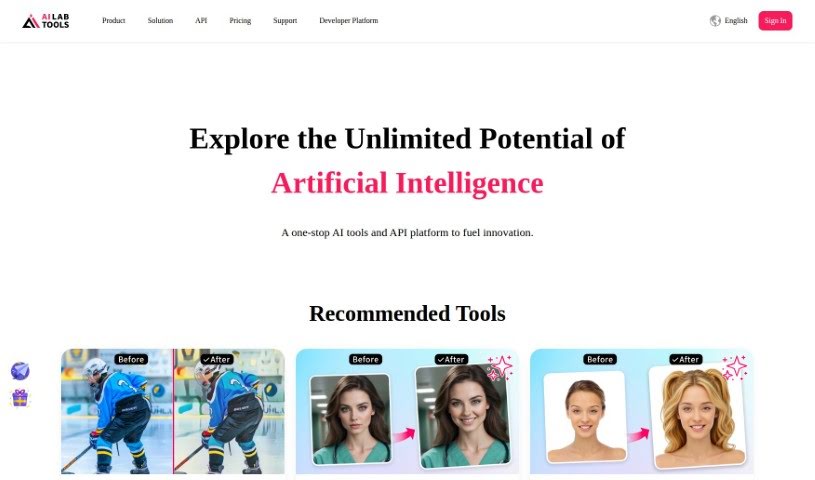
Screenshot of AILab Tools

AILab Tools

Discover what AILab Tools is and how to make the most of it in 2025. We'll walk through its features and see how it stacks up against other image generators.

Screenshot

What is AILab Tools?

AILab Tools is a really versatile platform packed with image editing features. You can do things like remove backgrounds, clear up hazy images, restore old photos, turn pictures into paintings, retouch portraits, enhance faces, and even erase parts of an image – the list goes on! It’s designed for everyone, whether you’re just editing personal photos or working on professional projects. It offers a whole suite of tools to make your images look better and do more with them. For developers, there’s also an API that lets you build your own custom image processing tools, integrating AI capabilities right into your own apps. Plus, it has some neat portrait editing options: you can change facial expressions, swap hairstyles, adjust age and gender, and even transform portraits into cartoons with a variety of artistic styles to pick from.

Who created AILab Tools?

AI Innovate Technology Limited, a company based in Hong Kong, launched AILab Tools on July 4, 2024. Their main focus is on using advanced AI in different areas to tackle tough real-world challenges and come up with smart solutions. The team is made up of experts in AI, machine learning, and computer vision, all committed to delivering top-notch technology. AI Innovate Technology’s goal is to be at the forefront of innovation by applying AI across various industries, aiming to boost efficiency, improve how decisions are made, and enhance user experiences. They believe AI will shape the future and are continually investing in research and development to help build that intelligent future.

What is AILab Tools used for?

  • Making images sharper and clearer (upscaling)
  • Restoring old or damaged photos
  • Removing backgrounds from images
  • Clearing up haze in photos
  • Fixing stretched or distorted images
  • Turning regular photos into paintings
  • Retouching photos to improve their look
  • Enhancing faces and adding blur effects
  • Erasing unwanted objects or elements from images
  • Changing facial expressions in photos
  • Modifying hairstyles in images
  • General photo retouching
  • Converting photos into various painting styles
  • Editing facial expressions
  • Changing hairstyles
  • Improving facial features

Who is AILab Tools for?

  • People who create content (like bloggers, social media managers)
  • Software developers
  • Marketing professionals

How to use AILab Tools?

Here’s a straightforward guide to using AILab Tools effectively:

  1. Get Started: First, head over to the AILab Tools website. You’ll need to sign up for an account or log in if you’re already a member.
  2. Upload Your Image: Once you’re in, upload the photo you want to work on. AILab Tools can handle a lot of different editing tasks, whether it’s portrait work, adding color to black and white photos, or just general image improvement.
  3. Pick Your Editing Tools: Browse through the wide selection of editing features. You can choose to change facial expressions, adjust someone’s age or gender, retouch portraits, remove backgrounds, clear up haze, and much more.
  4. Apply the Changes: Use features like sharpness enhancement to make images crisper, enlarge photos without losing quality, or integrate the API if you’re building your own custom image tools.
  5. Dive into Advanced Options: Don’t hesitate to try out the more advanced features. This includes turning photos into paintings, enhancing faces, using blur effects, erasing unwanted items, or removing specific objects.
  6. Understand the Costs: Take a look at the pricing plans to get a clear idea of the costs for the features you plan to use.
  7. Build Custom Tools (for Developers): If you’re a developer, you can use the AILab Tools API to create your own image processing applications. This can really help make your workflows more efficient and effective.
  8. Need Help? Contact Support: If you have any questions or need assistance, you can reach out to their support team via email or phone, which you’ll find on their website.

By following these steps, you’ll be able to make the most of AILab Tools for all your image editing and enhancement needs, whether for personal projects or professional work.

Related AI Tools

Discover more tools in similar categories that might interest you

123RF AI Image Generator

Creative Image Generation
Learn More

Stay Updated with AI Tools

Get weekly updates on the latest AI tools, trends, and insights delivered to your inbox

Join 25,000+ AI enthusiasts. No spam, unsubscribe anytime.