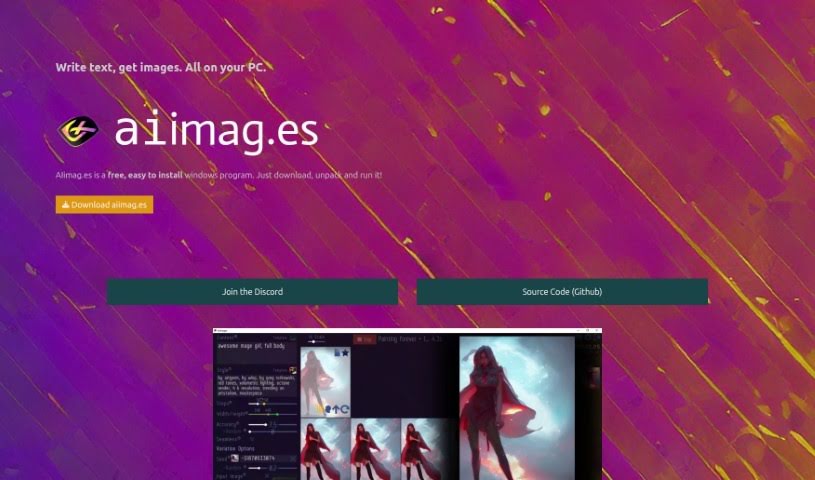
Screenshot of AIimages

AIimages

Discover what AIimages is and how to use it effectively in 2025. We'll explore its features and see how it stacks up against other AI image generators.

Screenshot

What is AIimages?

AIimag.es is a really user-friendly, free program for Windows that’s changing how we create images from text right on our PCs using AI. You can easily turn your words into pictures in just seconds, and guess what? No coding or complicated software needed! This tool is built on Stable Diffusion AI technology, which means you can quickly try out different ideas to refine your images. It’s perfect for both personal projects and commercial work.

Plus, it’s open source under the MIT license, so if you’re into that sort of thing, you can even contribute to the code on Github. It’s a great way to get into AI art without a steep learning curve.

Who created AIimages?

Sunija, a game developer from Munich, is the person behind Aiimag.es. He started this project with a clear goal: to make AI art accessible and super easy for everyone to use. The company itself is built on open-source principles, operating under the MIT license and using the powerful Stable Diffusion AI technology. Essentially, Aiimag.es lets you generate images from text quickly and efficiently, whether you’re just starting out or you’re a seasoned pro working on personal or commercial projects.

What is AIimages used for?

  • Text to Image Transformation: Simply type in what you imagine, and AIimag.es turns your text into images in seconds.
  • Fast Iterations for Refining Images: It’s designed for quick, fun ways to tweak and perfect the AI-generated images you create.
  • Free & Easy Installation: The program is completely free and straightforward to install, making it super accessible.
  • Commercial Use: You can create an unlimited number of pictures for free, and yes, that includes using them for commercial purposes.
  • Automatic PC Requirements Check: It helps you see if your computer is ready to go before you even start.
  • Open Source Platform: Built using the Unity Game Engine and Stable Diffusion AI, with code available on Github.
  • Community Support: Connect with other users on Discord to get help, share feedback, and be part of the community.
  • Contribute to the Source Code: If you’re technically inclined, you can even contribute to the project on Github.
  • Great for Everyone: It’s suitable for both beginners and experienced users.
  • No Coding Skills Needed: You can create amazing images without needing to write a single line of code.
  • Transforming Text into Images: This is the core function – using AI to bring your written ideas to life visually.
  • Catering to All Skill Levels: Whether you’re a novice or a professional, you’ll find it useful.
  • Built with Unity Game Engine: This is the foundation of the platform, making it robust.
  • Community Connection: The Discord server is a hub for support and sharing ideas.
  • Github Contributions: A place for collaboration and code improvements.
  • Automated System Checks: Ensures a smooth experience by verifying PC compatibility.
  • MIT License Access: Freedom to use and modify the code.
  • Future Possibilities: There’s potential for integration with other platforms down the line.
  • Quick Image Generation: Type text, get images fast.
  • Refine Your Creations: Easily perfect your AI art.
  • Simple Setup: Free and easy for Windows users.
  • Unity & Stable Diffusion: The tech behind the magic.
  • Unlimited Commercial Use: Create and use as many images as you need, commercially free.
  • Get Support: Join the Discord community.
  • Contribute Your Skills: Help improve the project on Github.
  • Accessible AI Art: Making it easy for everyone.
  • Windows Friendly: Designed for your PC.
  • Community Focused: Support and feedback are key.
  • Open Source Collaboration: Work on the code together.
  • Bring Ideas to Life: Turn imagination into visuals.

Who is AIimages for?

  • Novices: If you’re new to AI art, this is a perfect starting point.
  • Professionals: Get quick, high-quality images for your work.
  • Content Creators: Generate visuals for blogs, social media, and more.
  • Graphic Designers: Use it as a tool to spark ideas or create assets.
  • Marketing Professionals: Quickly produce eye-catching graphics.
  • Game Developers: Create concept art or assets for your projects.
  • AI Enthusiasts: Explore the latest in AI image generation.
  • Artists: Experiment with new ways to express your creativity.

How to use AIimages?

Ready to start creating? Here’s how to use AIimag.es to turn your text into images on your PC:

  1. Download and Install It:

    • First, grab the AIimag.es program from its official website.
    • Once downloaded, unpack the file. Make sure the folder path doesn’t have any spaces in it.
    • Then, just run the aiimages.exe file to get the program going.
  2. Turn Text into Images:

    • Type whatever you can imagine into the text box. This is where your words become the prompt for the AI.
    • The program will then generate images based on your text in just a few seconds.
  3. Refine with Fast Iterations:

    • Once you have your initial images, you can quickly tweak them. This part is really fun and helps you perfect the AI-generated art.
  4. Check Your System:

    • Before you dive in, make sure your PC meets the requirements. You’ll need Windows 10, a Nvidia graphics card (like the 1XXX, 20XX, or 30XX series), and at least 12 GB of free disk space.
  5. Good to Know:

    • Remember, AIimag.es is an open-source project under the MIT license. It’s built using the Unity Game Engine, Stable Diffusion AI, and the LStein repository implementation.
    • You can use AIimag.es for commercial purposes too – it lets you create unlimited pictures for free.
    • If you need help or want to share feedback, the community is active on Discord. You can also contribute to the source code on Github.

By following these simple steps, you can easily start using AIimag.es to create images from text on your Windows PC. It’s a great way to explore your creativity and see your ideas come to life visually!

Related AI Tools

Discover more tools in similar categories that might interest you

123RF AI Image Generator

Creative Image Generation
Learn More

Stay Updated with AI Tools

Get weekly updates on the latest AI tools, trends, and insights delivered to your inbox

Join 25,000+ AI enthusiasts. No spam, unsubscribe anytime.