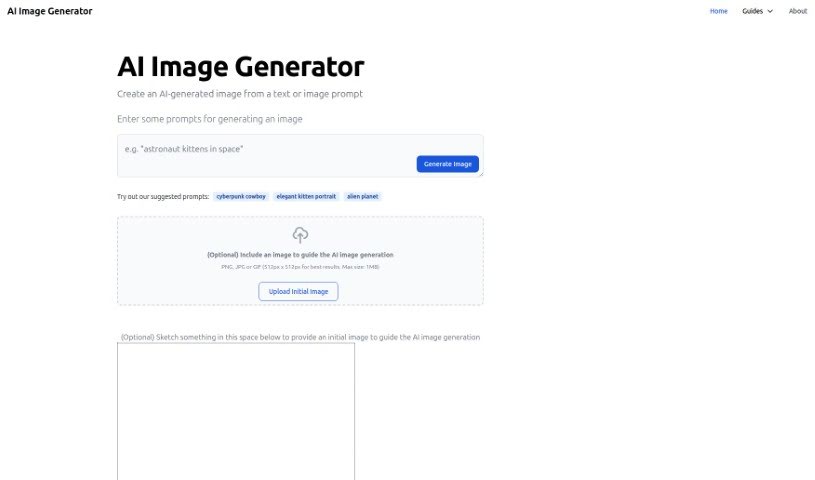
Screenshot of Aiimagegenerator

Aiimagegenerator

Discover what AI Image Generator is and how to use it effectively in 2025. We'll explore its features, compare it to other AI image tools, and show you how to get started creating your own unique artwork.

Screenshot

What is AI Image Generator?

AI Image Generator is a handy online tool that uses artificial intelligence to create unique, artistic images. You simply give it a text description or even an image, and the AI brings your ideas to life. It’s pretty neat because you can upload your own pictures or sketches to give the AI a starting point, helping it understand exactly what you’re going for.

This tool works by using a powerful AI model called Stable Diffusion. It is a sophisticated algorithm, common in deep learning, that’s trained to generate images. When you input your prompts, whether it’s text like ‘cyberpunk cowboy,’ ‘elegant kitten portrait,’ or ‘alien planet,’ or an image reference, the AI gets to work. For the best results, it’s recommended to use image prompts in PNG, JPG, or GIF format, ideally sized at 512px x 512px, and keeping the file size under 1MB.

What’s great about AI Image Generator is that it’s completely free and really easy to use. The interface is straightforward, and it’s available in several languages, making it accessible to everyone, no matter their tech background. It’s a fantastic way to explore the world of AI art, giving you the freedom to use whatever you create for your personal projects, schoolwork, or just for fun. Plus, you have control over your privacy settings and how personalized ads are shown.

Who created AI Image Generator?

The team behind AI Image Generator is easy to connect with! You can find them on Twitter, Instagram, and via email. They launched this tool on October 8, 2022. At its core, it uses advanced AI models, like Stable Diffusion, to turn your text or image ideas into art. The website itself is designed to be user-friendly, offering helpful prompt suggestions and the ability to upload your own images or sketches to guide the AI. You also have control over your privacy, and the tool supports multiple languages.

What is AI Image Generator used for?

AI Image Generator is incredibly versatile. Here’s a breakdown of what you can do with it:

  • Create stunning AI-generated images from simple text descriptions or by uploading your own images.
  • Use your own photos or sketches as a starting point for the AI to build upon.
  • Generate truly unique and artistic visuals powered by advanced AI models.
  • Guide the AI’s creation process by providing both text and image prompts.
  • Sketch directly on the website to give the AI an initial visual reference.
  • Dive into the exciting world of AI-generated art and see what you can create.
  • Get inspired with suggested prompts like ‘cyberpunk cowboy,’ ‘elegant kitten portrait,’ and ‘alien planet’ to kickstart your creativity.
  • Use your generated images freely for personal enjoyment, educational purposes, or artistic expression.
  • Explore the creative potential of AI models and discover new artistic avenues.
  • Produce eye-catching and original imagery for any project.
  • Generate AI images from text or image prompts – it’s that simple.
  • Let text and image prompts steer the AI in creating exactly what you envision.
  • Upload images or sketches to provide that crucial initial reference for the AI.
  • Craft unique and creative artwork with the help of sophisticated AI.
  • It’s a free online tool perfect for generating artistic images.
  • Explore the artistic capabilities of AI in a fun, accessible way.
  • Use the generated images for personal, educational, or artistic needs.
  • Find inspiration for crafting your own unique prompts on the platform.
  • Generate AI-generated images using text or image prompts.
  • Utilize text and image prompts to guide the AI’s generation process.
  • Upload images or sketches to provide initial references for AI image generation.
  • Use suggested prompts like ‘cyberpunk cowboy,’ ‘elegant kitten portrait,’ and ‘alien planet’ to create imaginative art.
  • Experiment with AI-generated art for personal, educational, or artistic purposes.
  • Manage your privacy settings for personalized advertising and content measurement.
  • Access the tool easily as it’s available in multiple languages.
  • Create personalized content with a user-friendly interface.
  • Generate visually appealing and unique artwork that stands out.

Who is AI Image Generator for?

This tool is a fantastic resource for a wide range of individuals, including:

  • Artists looking for new ways to express their creativity.
  • Designers seeking inspiration or unique visual assets.
  • Content creators needing engaging imagery for their platforms.
  • Students exploring digital art and AI technology.
  • Educators teaching about AI and creative tools.
  • Researchers investigating generative AI models.
  • Graphic designers wanting to expand their design toolkit.
  • Marketers looking for compelling visuals for campaigns.
  • Advertisers aiming to create eye-catching ads.
  • Marketing professionals and advertising creatives needing fresh ideas.

How to use AI Image Generator?

Getting started with AI Image Generator is straightforward. Just follow these simple steps:

  1. First, head over to the AI Image Generator website at https://www.aiimagegenerator.org/.
  2. Next, enter your prompts to guide the image creation. You can use text prompts, like ‘cyberpunk cowboy’ or ‘alien planet,’ or upload an image to use as your prompt.
  3. If you’re using an image prompt, make sure it’s in PNG, JPG, or GIF format. For the best results, aim for a size of 512px x 512px, and keep the file under 1MB.
  4. You also have the option to sketch directly on the website, which the AI can then use as an initial image reference.
  5. Once your prompts are ready, just click the ‘generate’ button. The AI will then create an image based on everything you’ve provided.
  6. Remember, the tool offers plenty of prompt inspiration, and you can generate all sorts of visually appealing and unique artwork.
  7. It’s important to know that AI Image Generator is free to use and designed for everyone, regardless of their technical skill level.
  8. Finally, you can manage your privacy settings, experiment freely with AI-generated art, and feel free to reach out to the team with any questions or feedback you might have.

These easy steps will help you unlock the creative possibilities of AI-generated imagery with AI Image Generator’s user-friendly platform.

Related AI Tools

Discover more tools in similar categories that might interest you

123RF AI Image Generator

Creative Image Generation
Learn More

Stay Updated with AI Tools

Get weekly updates on the latest AI tools, trends, and insights delivered to your inbox

Join 25,000+ AI enthusiasts. No spam, unsubscribe anytime.