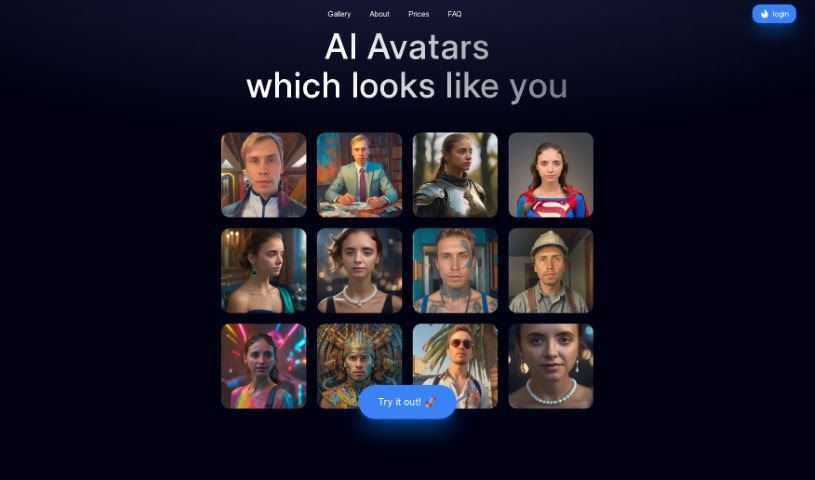
Screenshot of AI Portrait Generator

AI Portrait Generator

Discover what the AI Portrait Generator is and how to use it effectively in 2025. We'll explore its features and compare it to other AI portrait tools.

Screenshot

What is AI Portrait Generator?

The AI Portrait Generator is your personal digital artist, specializing in crafting unique and incredibly realistic avatars of you. This platform uses smart artificial intelligence to create avatars in all sorts of art styles, all based on photos you upload. To get started, you’ll need to upload about five well-lit pictures of yourself. The AI then trains a special neural network just for you, which goes on to create 200 unique avatars across more than 50 different styles. These avatars are really high-quality, coming in at 1024x1024 pixels. Plus, they’re planning a cool update soon that will let you upscale them to a whopping 2048x2048 pixels. Just a heads-up, though: the tool doesn’t work well with hats or glasses in your uploaded photos, and it definitely doesn’t use deep fake technology. It’s a one-time payment deal, no subscriptions here, which is pretty neat. Your privacy is also a big focus; they make sure only you can access the portraits you create. You can even get custom avatars by typing in text prompts, and all the avatars you generate are yours alone to keep and use.

Who created AI Portrait Generator?

Alexander Kozhevin is the creative mind behind the AI Portrait Generator, launching it on June 14, 2024. This platform lets anyone generate one-of-a-kind, lifelike avatars using the power of artificial intelligence. The company behind it really prioritizes user privacy, securely storing your data and making sure only you can access it.

Who is AI Portrait Generator for?

  • Graphic designers looking for unique character concepts
  • Artists wanting to experiment with AI-generated styles
  • Content creators needing distinctive profile pictures or assets
  • Photographers exploring new digital art forms
  • Digital marketers aiming for eye-catching visuals
  • Social media influencers wanting to stand out online

How to use AI Portrait Generator?

Here’s a straightforward guide to help you get the most out of the AI Portrait Generator:

  1. Uploading Your Photos:
    • Start by uploading five well-lit photos of yourself to the AI Portrait Generator platform. Make sure they show you from different angles.
    • It’s best to avoid wearing hats or glasses in these photos, as this helps the AI create more accurate avatars.
  2. Generating Your Personal Model:
    • The tool will then create a unique neural network model specifically trained on your uploaded photos.
    • This model is what the system uses to produce those 200 unique avatars in over 50 styles, usually within about an hour.
  3. Customizing Your Avatars:
    • Want to get really specific? You can customize your avatars using text-based prompts to design exactly what you envision.
    • Once generated, you can easily browse through more than 50 avatars in various styles right on the user-friendly dashboard.
  4. Avatar Quality Details:
    • The avatars you get are high-quality, with a standard resolution of 1024x1024 pixels.
    • Keep an eye out for the upcoming Upscale feature – it’s going to boost that resolution to 2048x2048 pixels!
  5. Extra Features and Enhancements:
    • They’re also planning a photo enhancer tool to make your avatar quality even better (coming soon).
    • Plus, you can create custom avatars just by using prompts and text descriptions.
  6. Payment and Refund Policy:
    • You make a one-time payment, which covers access to those 200 avatars and the neural network training.
    • Refunds are handled carefully and are generally for critical issues; if quality is a concern, they’ll look into re-training your model.
  7. Your Data Privacy and Access:
    • Rest assured, your data and the avatars created are secure. Access is strictly limited to you, the user.
    • They have strong privacy policies in place to ensure everything stays confidential and no one else can access your generated portraits.

By following these simple steps, you can easily customize and generate lifelike avatars on the AI Portrait Generator platform.

Related AI Tools

Discover more tools in similar categories that might interest you

123RF AI Image Generator

Creative Image Generation
Learn More
Stay Updated with AI Tools

Get weekly updates on the latest AI tools, trends, and insights delivered to your inbox

Join 25,000+ AI enthusiasts. No spam, unsubscribe anytime.