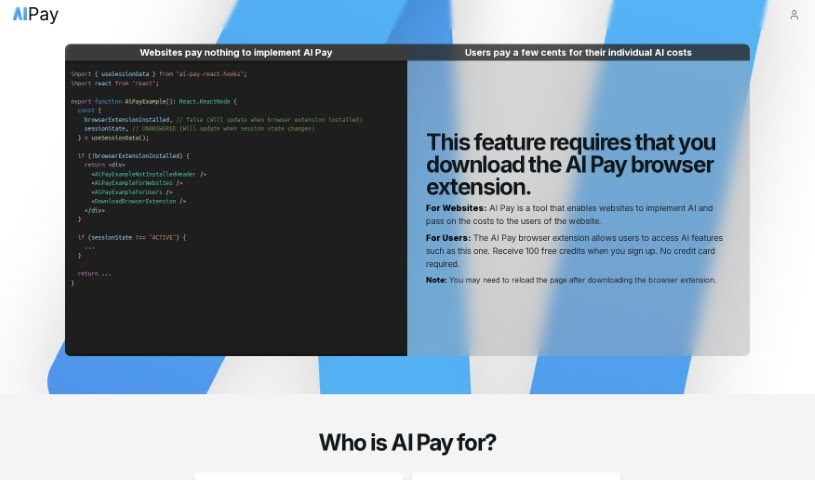
Screenshot of AI Pay

AI Pay

Discover what AI Pay is and how to use it effectively in 2025. Explore its features and see how it stacks up against other Affiliate Marketing Tools.

Screenshot

What is AI Pay?

AI Pay is a smart tool that lets websites add AI features or boost their main functions, with users covering the costs. It works hand-in-hand with a browser extension. To start using AI Pay, users simply set a budget and turn it on via the extension. This lets them access AI APIs without paying out-of-pocket, which really makes the user experience better. For websites, AI Pay is a win-win: they can improve how users interact with their site by adding advanced AI capabilities, and they get to join a unique way to make money. They can earn affiliate commissions when users buy credit. Plus, the tool handles all the tricky stuff like self-hosting or managing API keys, making it super easy and secure to use.

Who created AI Pay?

AI Pay was developed to help websites easily integrate AI features or enhance their core functions, with users footing the bill. This tool, which relies on a browser extension, first launched on February 24, 2024. While the specific company details and founder aren’t clearly laid out in the information I have, you might find more details if you look into other sources or documents about AI Pay.

What is AI Pay used for?

  • Powering AI websites: It helps run websites that use artificial intelligence.
  • Deploying open-source GPT apps: You can easily set up and use free GPT applications.
  • Implementing developer documentation chatbots: Create helpful chatbots for technical documentation.
  • Monetizing websites with AI features: Earn money by offering AI capabilities to your users.
  • Enhancing user experience with AI: Make your website more engaging and useful by adding AI.
  • Supporting users to utilize AI without self-hosting or managing API keys: Users can access AI without the technical hassle.
  • Earning commissions from user’s future credit purchases: Get a cut when users buy more credit later.
  • Allowing websites to utilize AI APIs for free within budget limits: Websites can use AI APIs without direct cost as long as the user’s budget lasts.
  • Enabling websites to pass AI costs to users: The cost of AI usage is covered by the end-user.
  • Merging AI capabilities with websites to improve user experience: Combine AI with your site for a better overall feel.
  • Open Source GPT Apps: Specifically for running free GPT applications.
  • Developer Documentation Chat Bot: Great for creating chatbots that help developers understand documentation.
  • Monetize website with optional AI features: Offer AI as an optional, paid feature.
  • Power any AI website: Use it to run virtually any website that needs AI.
  • Deploy open-source GPT apps without self-hosting or losing API keys: Keep your API keys safe and avoid managing servers.
  • Implement developer documentation chatbots and get paid for it: Build helpful chatbots and earn from their use.
  • Monetize websites by receiving a portion of users’ AI Pay usage cost: Earn a share of what users spend on AI.
  • Enrich user experience by integrating AI products: Make your site richer with AI tools.
  • Support users not willing to handle API keys or self-host: Help those who want AI without the technical setup.
  • Enable websites to earn from future credit purchases through the affiliate program: Get rewarded when users buy more credit later.
  • Utilize AI APIs for free within an active user session: Access AI APIs at no charge during a user’s session.
  • Provide a unique monetization model for websites through the affiliate program: Offer a special way for websites to earn money.
  • Allow websites to pass the cost to users with a session-based budgeting approach: Users manage AI costs by setting session budgets.
  • Monetize your website with optional AI features: Add AI as an optional revenue stream.
  • Deploying open-source GPT apps without self-hosting or sharing API keys: Securely run GPT apps without managing your own infrastructure.
  • Implementing developer documentation chatbots for open-source developers: Build useful chatbots for the open-source community.
  • Monetizing websites by receiving a portion of users’ AI Pay usage costs: Earn a commission from user AI spending.
  • Enhancing user experience with AI integration on websites: Make your site better by adding AI.
  • Supporting users who prefer not to handle API keys or self-hosting: Help users who want AI without the technical setup.
  • Enabling users to unlock AI features on websites: Give users access to AI tools on your site.
  • Providing a unique monetization model for websites: Offer a distinctive way for sites to earn.
  • Commission earning potential through the affiliate program: You can earn commissions by referring users.
  • Improving user experience through advanced AI capabilities: Make your site more advanced and user-friendly with AI.
  • Enabling non-technical users to enjoy AI technology without self-hosting or API key management: Let anyone use AI without technical knowledge.

Who is AI Pay for?

  • Developers: For building and integrating AI features.
  • Website Owners: To enhance their sites and monetize them.
  • Open-source developers: To deploy GPT apps and chatbots easily.
  • Websites integrating AI features: Anyone looking to add AI capabilities.

How to use AI Pay?

Here’s how you can get started with AI Pay:

  1. Starting an AI Pay Session: First, click on the AI Pay browser extension icon. After you’ve set your budget, just select ‘start session.’ This lets the website you’re on use AI features without any cost to them, really boosting the user experience.
  2. Benefits for Websites: AI Pay makes the user experience much better by adding advanced AI. It also offers a special way for websites to earn money: they get a commission from users who buy credit later on.
  3. User Experience Enhancement: You can use AI Pay to add AI products to your website. This gives users unique, extra value, making their overall experience on your site much more enjoyable.
  4. Session Management: Once your AI Pay session budget runs out, it automatically stops. The website won’t be able to use AI APIs for free anymore until a new session starts.
  5. User-Cost Coverage: Users decide how much they want to spend by setting a budget for their session on the website. As long as there’s money left in the budget, they can keep using AI APIs.
  6. AI Pay Browser Extension: This extension is your main tool for managing AI Pay. It lets you start sessions, pick your budget, and enjoy AI features on different websites.
  7. AI Features Integration: Websites can easily add all sorts of AI features with AI Pay. This includes things like open-source GPT apps and chatbots for developer documentation, making the site more functional and interactive.
  8. Affiliate Program: Websites can also benefit from AI Pay’s affiliate program. They can earn a 5% commission on any credit a user buys later, just for using AI Pay on their site.
  9. Monetization Model: AI Pay provides a way for websites to make money. They get a portion of what users spend on AI Pay usage, essentially earning through affiliate commissions.
  10. Technology Involved: AI Pay works by using advanced AI technology, integrating with websites, smart user interface designs, AI APIs, and a browser extension to function smoothly.

By following these steps and using what AI Pay offers, websites can really improve how users experience their site, create new ways to earn money, and seamlessly add AI functionalities.

Related AI Tools

Discover more tools in similar categories that might interest you

Stay Updated with AI Tools

Get weekly updates on the latest AI tools, trends, and insights delivered to your inbox

Join 25,000+ AI enthusiasts. No spam, unsubscribe anytime.