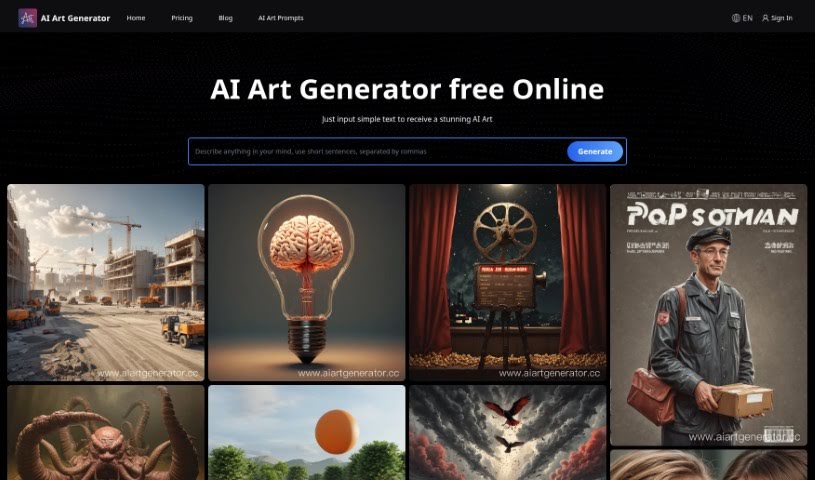
Screenshot of AI Art Generator

AI Art Generator

Curious about AI Art Generators? Learn what they are, how to use them effectively in 2025, explore their features, and see how they stack up against other art generators.

Screenshot

What is AI Art Generator?

The AI Art Generator from Ai Art Limited is a really neat artificial intelligence tool. It makes creating content much simpler and faster by turning your written ideas into images, videos, music, and even AI-generated text. You can use it to craft unique art images that look and feel totally natural. It’s available for both Apple and Android devices, offering speedy performance, free updates, round-the-clock support, and various pricing options to fit what you need. Basically, it can take an article you’ve written and transform it into all sorts of creative outputs. People seem to love it for its advanced technology, quick operation, easy-to-use interface, and how well it works across different platforms. If you want to stay in the loop on new features and changes, you can join the Ai Art Limited Discord channel.

Who created AI Art Generator?

Ai Art Limited is the company behind the AI Art Generator. They launched it on June 14, 2024. This tool is designed to take written material and transform it into different content formats, like images, videos, music, and AI-generated texts. You can find it on both the Apple App Store and Google Play Store. The platform boasts high-tech capabilities, fast performance, free updates, 24/7 customer support, and user-friendly widgets, making it a super convenient and efficient choice for anyone creating content.

What is AI Art Generator used for?

This tool is incredibly versatile! Here’s a rundown of what you can do with it:

  • Turn text into videos
  • Convert text into music
  • Create original music
  • Choose from a variety of pricing plans
  • Generate images
  • Create videos
  • Improve your overall user experience
  • Integrate with other apps
  • Transform written articles into images
  • Turn written articles into videos
  • Convert written articles into music
  • Generate images directly from text
  • Modify images with advanced features
  • Produce high-quality content
  • Transform written articles into various forms of content
  • Enjoy speedy performance
  • Convert written articles into images, videos, music, and AI-written text
  • Adapt it to your specific needs
  • Experience a smooth user journey
  • Benefit from cross-platform functionality
  • Create images, videos, and music
  • Transform written articles into images, videos, music, and AI-written texts
  • Use its AI Widgets functionality
  • Enhance your app’s capabilities
  • Seamlessly transform written articles into images, videos, music, and AI-generated texts
  • Get speedy content creation
  • Benefit from regular free updates for ongoing improvements
  • Access customer support 24/7
  • Enjoy an enhanced user experience thanks to AI widgets
  • Transform written articles into compelling content

Who is AI Art Generator for?

This tool is a great fit for a wide range of creative professionals and enthusiasts:

  • Artists
  • Graphic designers
  • Content creators
  • Marketers
  • Writers
  • Musicians
  • Designers

How to use AI Art Generator?

Ready to start creating? Here’s a simple, step-by-step guide to using the AI Art Generator:

  1. Get the App: First, head over to the Apple App Store or Google Play Store and download the app, which is called “Real AI Photo Generator.”
  2. Install It: Once downloaded, install the Real AI app on your device. Then you’re all set to start creating or editing photos using artificial intelligence.
  3. Explore the Features:
    • High Technology: You’ll be using advanced AI technology for all your content creation needs.
    • Fast Performance: Expect quick processing and generation times, so you can get your work done faster.
    • Free Updates: We regularly provide updates to keep the app’s functionality fresh and improved.
    • 24/7 Support: If you ever have questions or need help, our support team is available around the clock.
    • Enhanced Widgets: Check out the extra features we’ve included to make your experience even better.
    • Smooth Integration: Everything is designed to work together seamlessly, making your workflow efficient.
  4. Create Your Content:
    • Image/Video/Music Generation: You can easily translate your written ideas into different content types, including images, videos, and music.
    • AI-Generated Text: Transform your articles into unique, AI-produced art images that have a natural look and feel.
  5. Stay Updated and Get Help:
    • Stay Informed: Join the Ai Art Limited Discord channel to get the latest news on feature updates and announcements.
    • Customer Support: Don’t hesitate to reach out for 24/7 support if you need any assistance or guidance.
  6. Choose Your Plan:
    • Select a Plan: We offer different pricing plans – like Personal, Business, or Enterprise – so you can pick the one that best suits your needs.
    • Subscription Perks: Depending on your plan, you’ll get access to things like eCommerce widgets, product updates, future plugins, and premium support.
  7. See What Others Say:
    • Read Reviews: Take a look at user testimonials and ratings to get a sense of how satisfied people are and what their experience has been like.
  8. Understand the Policies:
    • Get the Details: You can find our detailed privacy policy and terms on the Ai Art Limited website. We believe in transparency.
  9. Modify Your Images:
    • Edit and Create: Use the AI technology within the app to modify your photos, allowing for personalized and unique creations.
  10. Dive into Advanced Options:
    • Explore More: Feel free to explore the advanced options in the app to generate even more customized and high-quality content.

By following these steps, you’ll be able to make the most of the AI Art Generator for all your innovative content creation and modification projects.

Related AI Tools

Discover more tools in similar categories that might interest you

123RF AI Image Generator

Creative Image Generation
Learn More

Stay Updated with AI Tools

Get weekly updates on the latest AI tools, trends, and insights delivered to your inbox

Join 25,000+ AI enthusiasts. No spam, unsubscribe anytime.