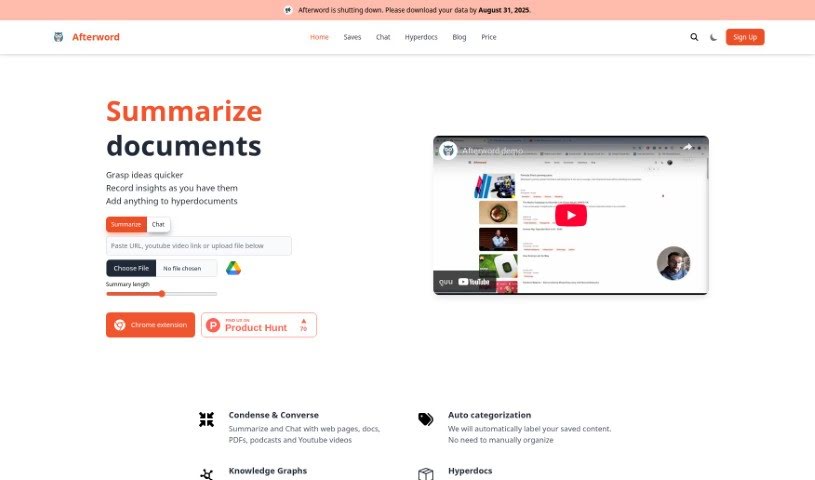
Screenshot of Afterword

Afterword

Discover what Afterword is and how to make the most of its features for summarizing web articles, videos, and audio in 2025. We'll cover its capabilities and how it stacks up against other summarizers.

Screenshot

What is Afterword?

Afterword is a really versatile tool that can summarize all sorts of content. Think web articles, YouTube videos, plain text, and even audio files – it handles them all. What’s neat is that you can save all your summaries right in your account. Plus, it integrates with Pocket, letting you import your saved items. It even automatically labels your saves, making it super easy to find what you’re looking for later. You can get content into Afterword by just pasting a URL, uploading a file, or using their handy Chrome extension. It’s pretty flexible with file types, too, supporting PDFs, DOCX, EPUB, MP3, and MP4. If you’ve got a YouTube video you need summarized, Afterword can turn it into text for you. You get to decide how long the summary should be, and it offers helpful features like verifying the original source, automatically categorizing your saves, and letting you add your own notes to the summaries.

The team behind Afterword is led by Mohammed, who’s the CEO. He brings a ton of experience from engineering and building startups. Aneesh is the CTO, combining his tech skills with a background in filmmaking, which is a pretty interesting mix!

Who created Afterword?

Mohammed Kheezar Hayat is the person behind Afterword, and he’s also the CEO. Mohammed has spent about 7 years working as an engineering lead and was previously a technical architect. He’s got a proven track record, having successfully guided a B2B startup with 20 employees all the way to profitability. Complementing him is Aneesh Arora, the CTO. Aneesh has experience as a Tech lead and also works as a professional filmmaker. He’s been involved in ERP projects and has even created ads for well-known brands like Coke.

What is Afterword used for?

Afterword is incredibly useful for a variety of tasks:

  • Summarizing YouTube videos
  • Summarizing web articles
  • Summarizing text and audio files
  • Saving all your summaries directly in your account
  • Importing your saved content from Pocket
  • Automatically labeling your saves so you can easily search through them
  • Getting quick summaries of long YouTube videos
  • Condensing technical documents into digestible summaries
  • Creating concise notes for easier memorization
  • Using a flexible Chrome extension that lets you control the exact length of your summaries
  • It supports a wide range of file types, including PDFs, DOCX, EPUB, MP3, and MP4.
  • You can also rely on features like source verification, auto-categorization, and annotation for your summaries.

Who is Afterword for?

Afterword is a great tool for a diverse group of people:

  • Professionals who often deal with long, technical documents.
  • Filmmakers looking to quickly grasp key information.
  • Content creators who need to process a lot of material.
  • Researchers needing to synthesize information efficiently.
  • Students trying to keep up with readings and lectures.
  • Anyone who takes a lot of notes or uses writing apps.
  • It can also be a valuable assistant for LLMs and other writing tools.

How to use Afterword?

Using Afterword is straightforward. Here’s how you can get the most out of it:

  1. Start by pasting a URL, uploading a file, or using the Chrome extension to grab content from the web.
  2. Afterword will then process whatever you’ve provided and give you a summary tailored to the length you want.
  3. Remember, Afterword works with many file types like PDFs, DOCX, EPUB, MP3, and MP4.
  4. It’s particularly handy for YouTube videos, as it can convert them into text summaries, giving you fast access to the main points.
  5. You have precise control over how long your summaries are, and you can also use features like source verification, auto-categorization, and annotation to make them even more useful.
  6. If you need to create multi-level summaries, Afterword is definitely a tool worth considering.
  7. Want to connect it with Pocket? Just click your profile icon, choose Pocket from the menu that pops up, and then click “Connect.”
  8. Once connected, Afterword lets you import your Pocket saves, automatically labels everything into categories you can search, and keeps all your summaries saved in your account.

By following these simple steps, you’ll be able to use Afterword really effectively to summarize different kinds of content and keep all your important information organized and easy to find.

Related AI Tools

Discover more tools in similar categories that might interest you

Academic Help Free Essay Generator

Education Academic Writing
Learn More

Stay Updated with AI Tools

Get weekly updates on the latest AI tools, trends, and insights delivered to your inbox

Join 25,000+ AI enthusiasts. No spam, unsubscribe anytime.