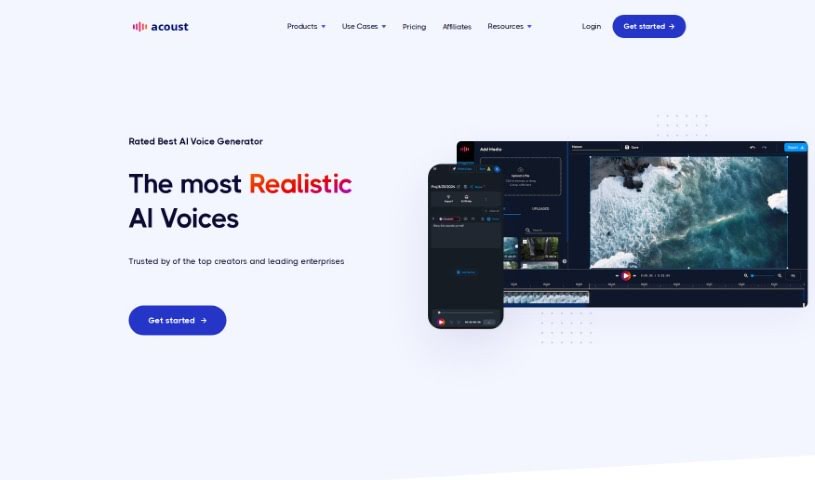
Screenshot of Acoust

Acoust

Discover Acoust in 2025: a powerful Text-to-Speech tool. Learn its features, how to use it effectively, and see how it stacks up against other Text-to-Speech options.

Screenshot

What is Acoust?

Acoust is an online Text-to-Speech (TTS) tool that uses advanced neural AI technology to quickly create audio that sounds incredibly natural. You’ve got a huge selection to choose from – over 200 voices across more than 30 languages! Plus, you can download your audio in popular formats like MP3, WAV, or OGG. The whole idea behind Acoust is to ditch those robotic voiceovers and give you studio-quality audio in mere seconds, no voice actors needed. It even comes with an AI assistant, powered by ChatGPT, to really boost your creativity and help out with all sorts of content creation. Think social media posts, training materials, e-learning modules, audiobook narration, explainer videos, IVR voiceovers, and so much more.

Who created Acoust?

Acoust was developed by Acoust AI. It’s an online Text-to-Speech (TTS) tool that really harnesses neural AI technology to instantly produce audio that sounds remarkably natural. It first launched on March 10, 2023. Acoust gives you access to over 200 voices in more than 30 languages, and you can easily download the audio in MP3, WAV, or OGG formats. The tool is designed to eliminate robotic voiceovers, offering studio-quality audio in just seconds without needing to hire voice actors. What’s more, Acoust includes an AI assistant powered by ChatGPT. This helps enhance creativity and makes content creation much smoother, making it a fantastic choice for many uses like social media content, training, e-learning, converting documents to audio, explainer videos, audiobook narration, and IVR voiceovers.

What is Acoust used for?

  • Create voice-overs for your YouTube videos and social media content.
  • Develop training materials for a global workforce.
  • Listen to documents, notes, and text files to learn faster.
  • Craft explainer videos that feature engaging AI voices.
  • Narrate audiobooks tailored to your specific preferences.
  • Transform customer experiences with AI-powered IVR voiceovers.
  • Produce training and e-learning content that’s both effective and accessible.
  • Convert documents, notes, and text files into audio for easier learning.
  • Create explainer videos that use human-like AI voices.
  • Narrate audiobooks based on your preferences or even create your own.
  • Generate studio-quality audio for video production and various projects.
  • Make content for social media production quickly and easily.
  • Produce voice-overs at scale for your videos.
  • Update content on the go with simple tools.
  • Listen to documents, notes, and text files for learning purposes.
  • Craft explainer videos that feature human-like AI voices.
  • Narrate audiobooks with customizable voice preferences.
  • Generate training content for a global workforce.
  • Convert documents to audio for easier learning.
  • Produce engaging explainer videos with AI voices.
  • Narrate audiobooks based on preferred settings.
  • Listen to documents, notes, and text files for easier learning.
  • Craft engaging explainer videos with human-like AI voices.
  • Narrate audiobooks based on preferred voice characteristics.
  • Create training content for a global workforce.
  • Narrate audiobooks with customizable voice characteristics.

Who is Acoust for?

  • Social media managers
  • Video Producers
  • Training professionals
  • E-learning Instructors
  • Audiobook narrators
  • IVR Designers
  • Social Media Managers
  • Video producers
  • Educators
  • Content creators
  • Audiobook narrators
  • Customer service representatives
  • YouTubers
  • Training Managers
  • Content creators
  • Teachers
  • Real estate professionals
  • University staff
  • Social media content creators
  • Educational institutions
  • Social media content creators
  • Training specialists
  • E-learning developers
  • IVR voiceover specialists

How to use Acoust?

Using Acoust, your go-to online Text-to-Speech (TTS) tool, is pretty straightforward. Just follow these simple steps:

  1. Access the Acoust Platform: Head over to the Acoust website. You’ll need to sign up for an account if you’re new, or just log in if you’re already a user.
  2. Pick Your Voice: Dive into the selection of over 200 natural-sounding voices available in more than 30 languages. Find the perfect voice that fits your project.
  3. Generate Your Audio: Type in the text you want to convert to speech. Acoust’s neural AI technology will then instantly create natural-sounding audio for you. You can even tweak things like the speaking speed and pitch.
  4. Download Your Audio: Once the audio is ready, you can easily download it in MP3, WAV, or OGG format, perfect for whatever project you’re working on.
  5. Explore the Many Uses: Acoust is great for all sorts of things, including creating social media content, developing training and e-learning materials, turning documents into audio, making explainer videos, narrating audiobooks, setting up IVR voiceovers, and much more.
  6. Check Out Extra Features:
    • Speech to Text: Acoust also has a Speech to Text feature. It converts spoken words into text, making it super easy to integrate with AI voices.
    • Team Accounts: If you’re working with others, Acoust offers team account options that can be customized to fit your group’s needs.
    • SSML Support: Want more control over your audio? You can use Speech Synthesis Markup Language (SSML) for extra customization.
  7. Get Help and See What Others Say: Acoust provides helpful FAQs to answer your questions, and you can also check out customer testimonials to see how effectively people are using the tool in real-world situations.

By following these steps, you’ll be able to use Acoust’s powerful features to create engaging and professional audio content for a wide variety of applications.

Related AI Tools

Discover more tools in similar categories that might interest you

Stay Updated with AI Tools

Get weekly updates on the latest AI tools, trends, and insights delivered to your inbox

Join 25,000+ AI enthusiasts. No spam, unsubscribe anytime.