123RF AI Image Generator
Creative Image Generation
Learn More
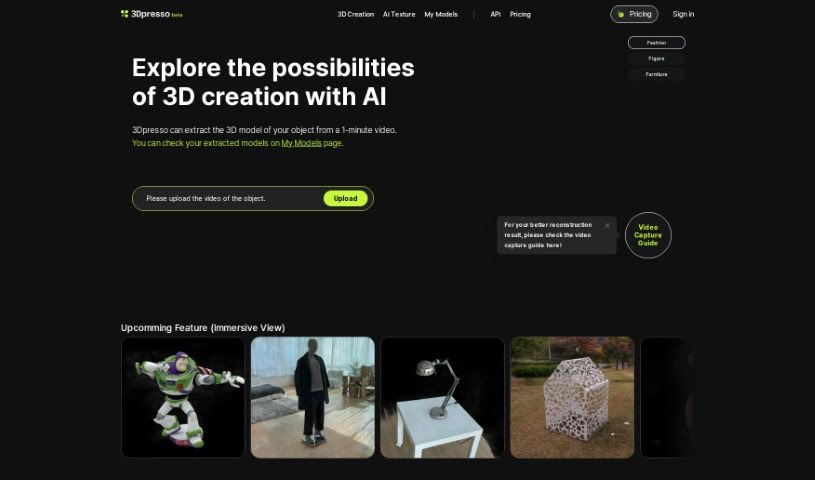
Learn what 3Dpresso is and how to use it effectively in (2025). Explore its features and how it compares with other 3D Model Generators.
3Dpresso is a web-based platform that’s really designed to make it super easy for creators to build 3D content. It lets you grab a 3D model by simply recording a short video, about 1-2 minutes long, of an object. Then, you just upload that video to the platform. What’s really neat is that 3Dpresso also lets you change the texture of your 3D model using text prompts, thanks to Generative AI. You’ll get an email notification when your 3D model is all set and ready for you to download, and this usually takes about 30 minutes. For folks using iPhones, there’s also a Capture App available that helps you record objects more steadily, leading to even better results.
3Dpresso first launched on March 22, 2023, and it was brought to life by RECON Labs. It’s a web-based solution, which means you can access it right from your browser, and it’s built to help creators extract 3D models. All you need to do is upload a 1-2 minute video of an object. On top of that, it has this cool AI Texture feature that lets you change the look and feel of your 3D models just by typing in text prompts.
3Dpresso is a versatile service for creating 3D models. You can use it as a 3D model extraction service, specifically for creating models from a 1-2 minute video. It’s great for applying multiple textures to a single model, and the platform provides clear guidelines for commercial use. The capturing app it offers is both user-friendly and powerful, making the process smoother. You can extract a 3D model from a 1-2 minute video, and then you can change the texture of that 3D model using text prompts with Generative AI. This allows for creating multiple textures on a single model.
The platform also guides you with real-time correct shooting methods, which really helps in getting more stable results. For commercial use, there are different requirements depending on the pricing tier you choose. The 3D models are provided in *.glb format, and they’re planning to support *.usdz, *.obj, and *.fbx formats soon. You’ll notice enhanced detail in the Video to 3D conversion process, which is particularly helpful for tricky areas like heads and ankles. They’ve also stopped offering the Sketch to 3D and Text to 3D test features. You’ll get an email notification when your 3D model is ready for download.
You can create 3D models by capturing objects with your smartphone camera and then uploading the video to the platform. It’s all about extracting a 3D model from a 1-2 minute video of an object. You can also change the texture of the 3D model using text prompts via Generative AI. The platform really focuses on enhancing detail in the Video to 3D conversion, especially for those challenging areas like heads and ankles. They guide users with real-time correct shooting methods to ensure more stable results.
You can also use the platform to search for existing 3D models or even modify models you already have using the AI Texture feature. For commercial purposes, you can use the 3D models, but this depends on your subscription tier. You’ll get email notifications when your 3D model is ready, and you can download the files directly from the webpage. The Capture App for iOS is there to help improve the quality of the captured object models.
Essentially, you can extract 3D models from videos, customize textures using text prompts, and create 3D models from just a 1-2 minute video. Commercial use is supported, with varying requirements based on your pricing tier. Using the 3Dpresso Capture App is recommended for more stable results during model creation. Models are downloadable in *.glb format, and you can also access creator tutorials and community support. Merging multiple textures on a single model is also a capability, and they’re enhancing detail in Video to 3D conversions. As mentioned, Sketch to 3D and Text to 3D test features are being discontinued. You can also expect priority customer support.
The platform extracts 3D models from videos and allows texture customization via text prompts. You can download models in *.glb format, and they even feature some models. The capturing app is easy to use, and they include creator tutorials. There’s also a Discord community for users. It’s all about making creator convenience a priority for creating 3D content. You can extract a 3D model from a 1-2 minute video, change its texture using text via Generative AI prompts, and customize textures with text prompts. You can create 3D models using your smartphone camera app or the dedicated 3Dpresso Capture App. Commercial usage of 3D models is available, with different attribution requirements based on your pricing tier. You can also cancel your subscription at any time without any additional charges after cancellation.
Creating 3D content is made convenient by extracting a 3D model from a 1-2 minute video of an object. You can change the texture of the 3D model using Generative AI prompts. The 3D models can be used for commercial purposes, with varying attribution requirements based on your pricing tier. You can capture objects using a smartphone camera app or the 3Dpresso Capture App for more stable results. Model formats available for download include *.glb initially, with plans to add *.usdz, *.obj, and *.fbx formats. You’ll receive a notification email when your 3D model is ready for download. You can also utilize the ‘AI Texture’ feature to modify textures using text prompts. Canceling your subscription is straightforward, with no extra charges after cancellation. They’ve also enhanced detail in Video to 3D conversion, particularly for challenging areas like heads and ankles. An addition of a floor removal parameter to the API is available for further customization. You can change the texture of 3D models using Generative AI prompts and create 3D models from 1-2 minute videos. Commercial use of 3D models is supported with varying attribution requirements based on your pricing tier. The platform also offers 3D model editing and file format export, along with creator tutorials and guidance. You can also join the Discord community for users, and you’ll get email notifications for model availability.
3Dpresso is a fantastic tool for a wide range of creative professionals and enthusiasts. It’s perfect for:
Basically, if you need to create or work with 3D content, 3Dpresso can likely help streamline your process.
Using 3Dpresso is a pretty straightforward process, and it’s designed to be as user-friendly as possible. Here’s a step-by-step guide to get you started:
Following these steps should help you get the most out of 3Dpresso, making it easy to create 3D models from videos and customize their textures with AI prompts.
Discover more tools in similar categories that might interest you
Get weekly updates on the latest AI tools, trends, and insights delivered to your inbox
Join 25,000+ AI enthusiasts. No spam, unsubscribe anytime.